 Easy BeezyApp StoreGoogle PlayRuStoreInstall
Reminders and messages
How to confirm an appointment to a client
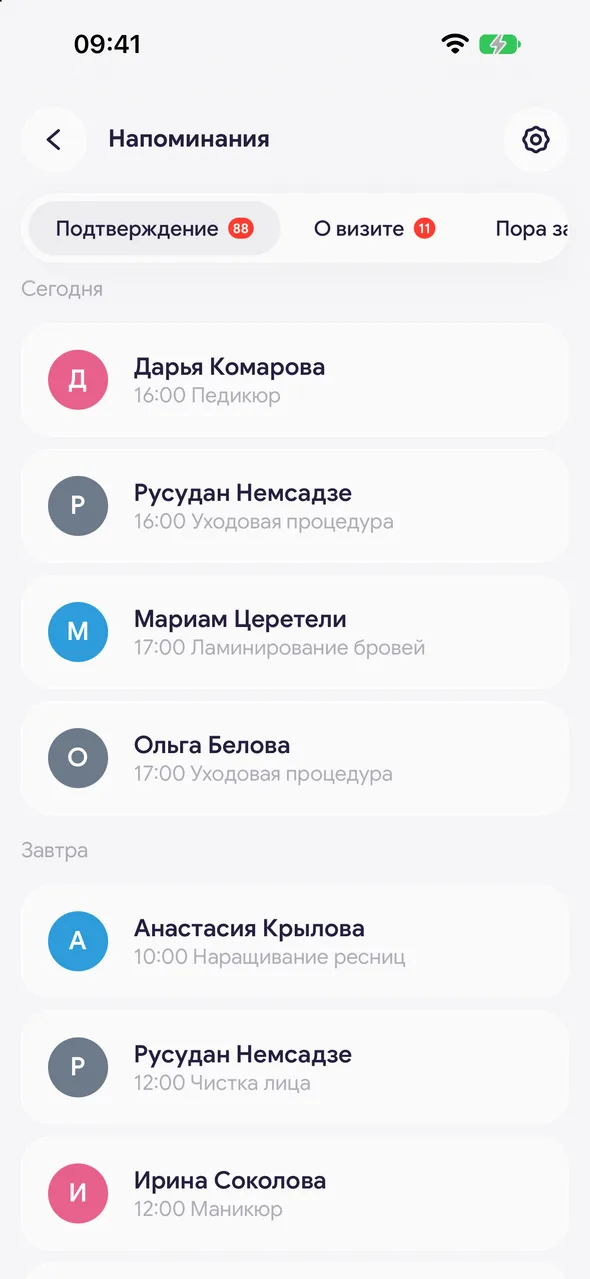
Right after booking, it's worth sending the client a confirmation with the date, time and address. Every new appointment goes to the «Appointment confirmation» section.
Step by step
- 01
Right after booking
When you create an appointment, a prompt with the «Send confirmation» button appears at the bottom of the screen. Tap it - a sheet with a ready-made text opens.
- 02
Or later from the section
«Profile» - «Reminders» - «Booking confirmation». Tap the client, choose a messenger and mark as sent.
Good to know
When you confirm an online booking request, the confirmation sheet opens automatically - with the contacts the client left in the request.
For an appointment in the past there is no confirmation button - there's nothing to confirm.
The text is changed in «Reminder settings» - the «Booking confirmation» template.
Questions and answers
FAQ
The client booked themselves on the website. Do they need a confirmation?
Yes, such an appointment also goes to the «Appointment confirmation» section. If SMS reminders are enabled, the confirmation may also be sent automatically via SMS.
See also
Free for a solo master
Try Easy Beezy
Calendar, clients, services and an online booking page - with no time limit. For a salon with a team - 14 days of full access.


