 Easy BeezyApp StoreGoogle PlayRuStoreInstall
App features
Calendar for booking clients
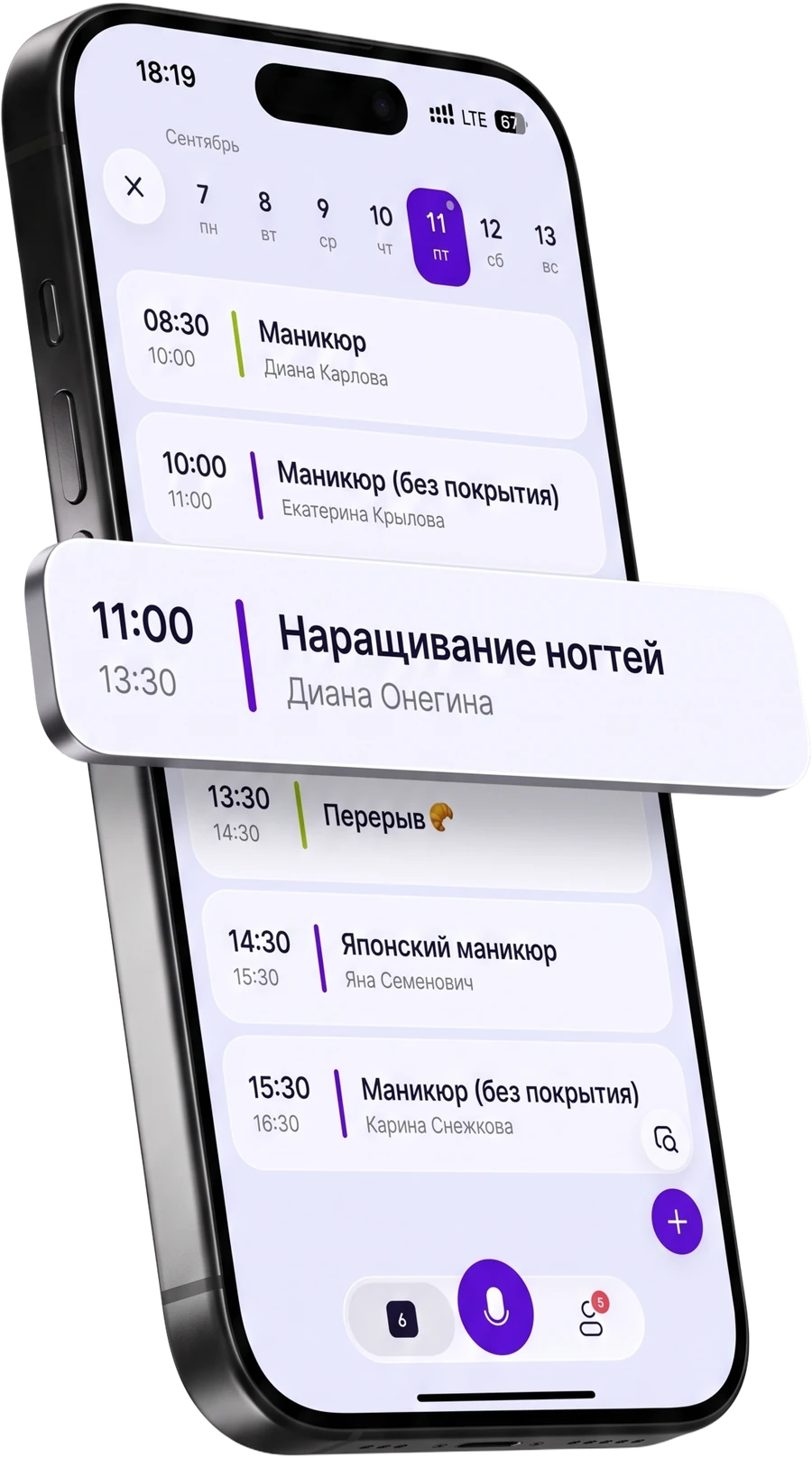
The calendar is the app's main screen. "Day" shows appointments by the hour, "Month" shows the overall workload. Appointments open, get moved and edited on the go, including without the internet: the schedule lives on the phone, not just on the server.
Free on any plan


In short
Let's break it down
Day and month - two views of one schedule
Work schedule: by days of the week or by dates
Booking open until date
Reschedules, series and personal records
Day and month - two views of one schedule
The day view shows what's happening now and what's next, with gaps between appointments. You choose the grid step yourself: some prefer fifteen minutes, others an hour.
The month answers a different question - "when am I actually free". Past days aren't dimmed: that's how you review how the week went.
Work schedule: by days of the week or by dates
The usual mode is by days of the week: Tuesday from ten to eight, Wednesday off. Set it once and the slots on your booking page are calculated automatically.
The second mode is by dates: you mark only the days you work. Handy for shift schedules and for renting a room by the day. Important to remember: in this mode an unmarked day is a day off, and the app warns you about it separately.

Booking open until date
Below the schedule there's a cutoff: beyond it a client can't book a time. It's for those who don't want to plan six months ahead while they don't know their own plans.
Anyone setting up the salon sets the cutoff, and it is visible right in the profile: "Booking open until November 30". When the date passes, the line is highlighted - meaning there is no more free time on the page and it is time to move the date.
Reschedules, series and personal records
A booking is rescheduled right in the calendar, and you can immediately send the client a message about the new time. A series - for example, a touch-up every three weeks - is created by the voice assistant in one phrase and deleted entirely in one phrase too.
Lunch, travel and study live in the same calendar and block time just like appointments. So a client will not pick an hour when you physically cannot make it.
Questions and answers
Frequently asked questions
Does the calendar work without the internet?
Yes. Bookings and client cards are stored on the phone and open without a network - this matters in a room where the signal is poor. When the internet comes back, changes sync to the server on their own.
Can I manage several masters in one calendar?
Yes, that is the TEAM subscription: each employee has their own schedule and their own bookings in a shared calendar. On PRO the calendar has one master - you.
Is there a widget on the phone screen?
Yes, the "Day" widget shows today's bookings without opening the app, and tapping it takes you straight to the booking.
Does the booking reminder go to me or to the client?
To both. You set how many hours in advance the push arrives for yourself, and the client gets a separate reminder.
Who it's for
For beauty pros who need it every day
Built around each specific craft: its own timelines, its own supplies, its own clients.
 Courses and house callsApp for massage therapistsMemberships, recurring appointments and a treatment room schedule without overlaps.
 Course of treatmentsApp for cosmetologistsCourse treatments, repeat visits and skincare protocol notes.

Next
Other app features
Bookings, clients, money and stock are all connected - one page for each.
 Fewer no-showsClient appointment remindersConfirmation, a reminder the day before, a thank-you and a review request
 For those not on chat appsSMS reminders to clientsCodes and SMS reminders for clients who aren't on messengers

Free for a solo master
Try Easy Beezy
Calendar, clients, services and an online booking page - with no time limit. For a salon with a team - 14 days of full access.
Calendar for booking clients in Easy Beezy is part of the client booking app used by independent beauty pros, studios and salons. Appointments calendar for the day and the month, work schedule by days of the week or by specific dates, the "booking open until" cutoff. Works without the internet.
The app runs on iPhone and Android. For a solo beauty pro, the calendar, clients, services and online booking page are free with no time limit; a salon with a team gets 14 days of full access.