 Easy BeezyApp StoreGoogle PlayRuStoreInstall
Online booking
How to choose which services are visible online
Only selected services appear on the page. The rest stay in the app and you can book clients for them manually.
Step by step
- 01
Open the services tab
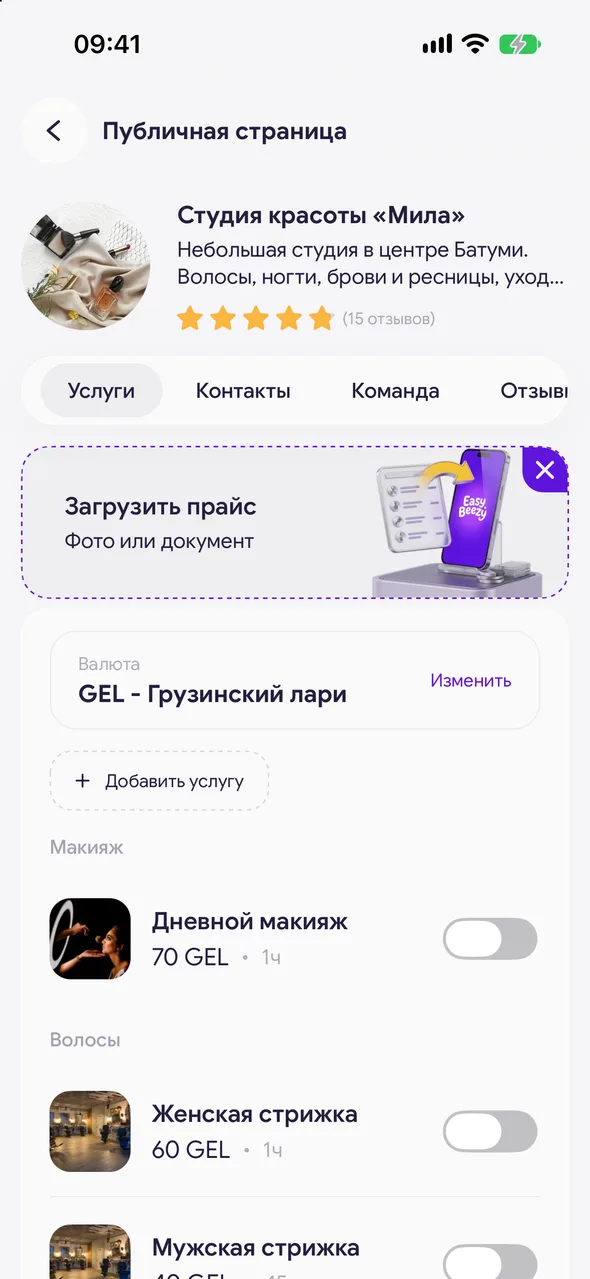
«Profile» - «Online booking» - «Set up» - the «Services» tab. Services are grouped by category.
- 02
Select services
The toggle to the right of a service enables it on the page. Tap «Save» at the top.
- 03
Add or edit a service
«Add service» creates a new one; tapping a service opens its card: name, price, duration, photo. The price currency is changed via the «Currency» line - «Change».
Good to know
The same choice is available in the service card itself - the «Online booking» toggle.
Above the list there is an invitation to upload a price list by file, photo or link - services will be created automatically.
A client can select several services on the page at once: the time is chosen for their total duration.
Questions and answers
FAQ
A client says they can't see a service on the page. What should I check?
Whether the service's toggle is on in the «Services» tab, whether «Save» was tapped, and whether a specialist who is enabled on the page is assigned to the service.
See also
Free for a solo master
Try Easy Beezy
Calendar, clients, services and an online booking page - with no time limit. For a salon with a team - 14 days of full access.


