 Easy BeezyApp StoreGoogle PlayRuStoreInstall
Online booking
How to open booking only until a certain date
«Booking window» - the boundary beyond which a client cannot take a time. Useful if the schedule for the next month isn't ready yet.
Step by step
- 01
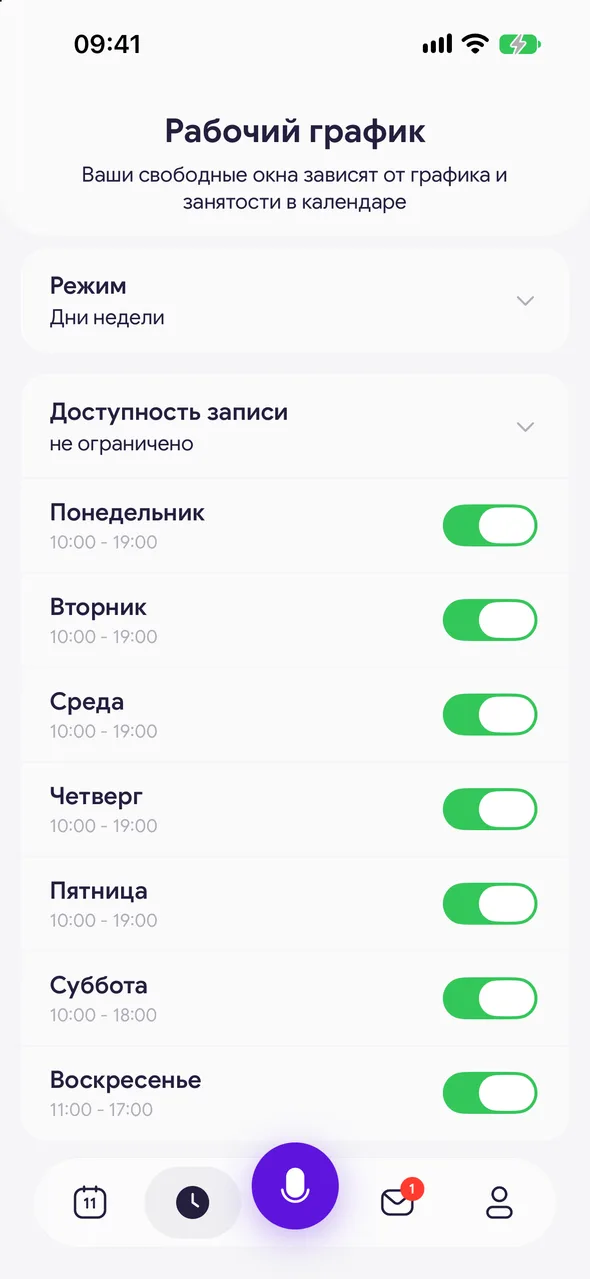
Open the work schedule
The «Work schedule» button on the bottom panel. For a specialist without a team, the same block is on the «Working hours» tab of the page settings.
- 02
Tap «Booking window»
The line above the days of the week. Currently it shows «no limit».
- 03
Choose a date
Mark the last day on which booking is possible. To remove the limit - «No limit».
Good to know
The boundary is shared by all specialists in the salon.
When the date passes, in «Profile» the schedule label turns red: online booking is no longer possible. Move the date forward.
By default there is no limit.
Questions and answers
FAQ
Why don't clients see free time next month?
Check «Booking window» in the work schedule: if a date is set there, booking beyond it is not possible.
See also
Free for a solo master
Try Easy Beezy
Calendar, clients, services and an online booking page - with no time limit. For a salon with a team - 14 days of full access.


