 Easy BeezyApp StoreGoogle PlayRuStoreInstall
Online booking
How to temporarily disable online booking
Booking can be paused: the page remains at its link, but clients can't book on it. All settings are preserved.
Step by step
- 01
Find the toggle
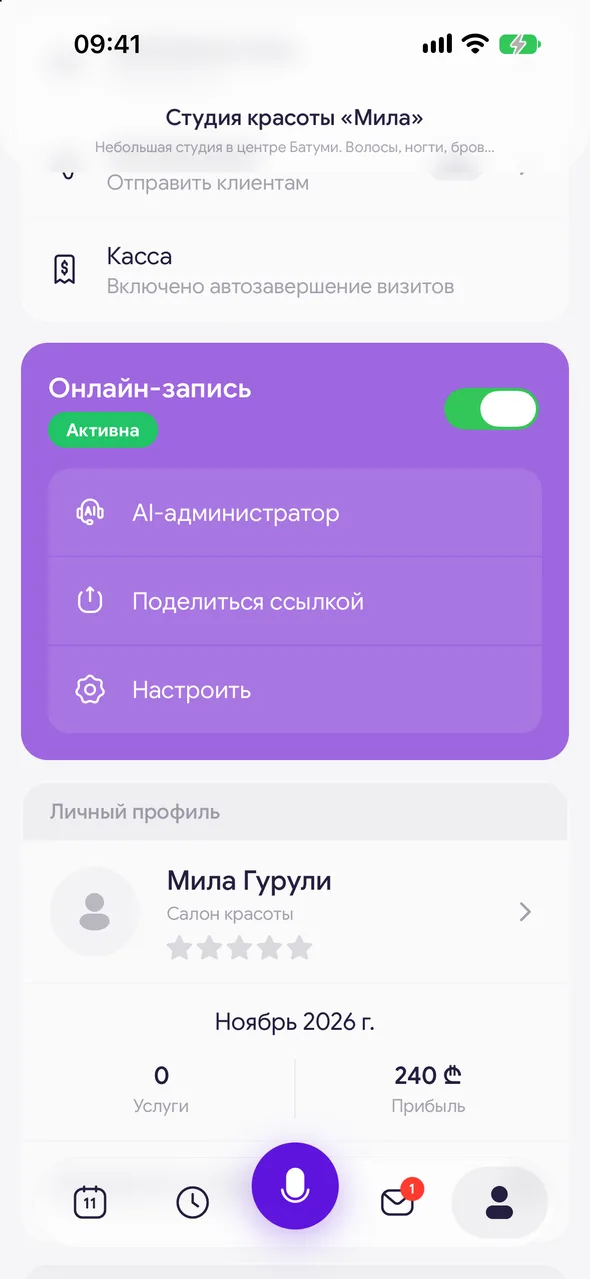
«Profile» - the «Online booking» block. Next to the block name there is a status: «Active» or «Disabled», and a toggle.
- 02
Turn it off
Move the toggle. The app will ask «Turn off online booking?» - tap «Turn off». Clients will not be able to book through your link until you turn it back on.
- 03
Turn it back on
The same toggle. No confirmation needed, the page immediately accepts bookings again.
Good to know
Via the link, the client will see «Online booking is temporarily paused» and contact details.
During the pause, the page disappears from the catalog but remains in Google and Yandex search.
To close only certain days, it's more convenient to use days off in the work schedule or the «Booking window» boundary - then booking remains open for the other days.
Questions and answers
FAQ
I turned off booking, but did bookings in the calendar disappear?
No. The toggle only closes new bookings via the page. Existing bookings remain in the calendar.
See also
Free for a solo master
Try Easy Beezy
Calendar, clients, services and an online booking page - with no time limit. For a salon with a team - 14 days of full access.


