 Easy BeezyApp StoreGoogle PlayRuStoreInstall
Finance and analytics
How to record a payout to an employee
A payout to an employee is an expense linked to a person. This way you can see how much the specialist earned and how much they have already received.
Step by step
- 01
Open a new expense
«Finance & analytics» - «+» - «Expense».
- 02
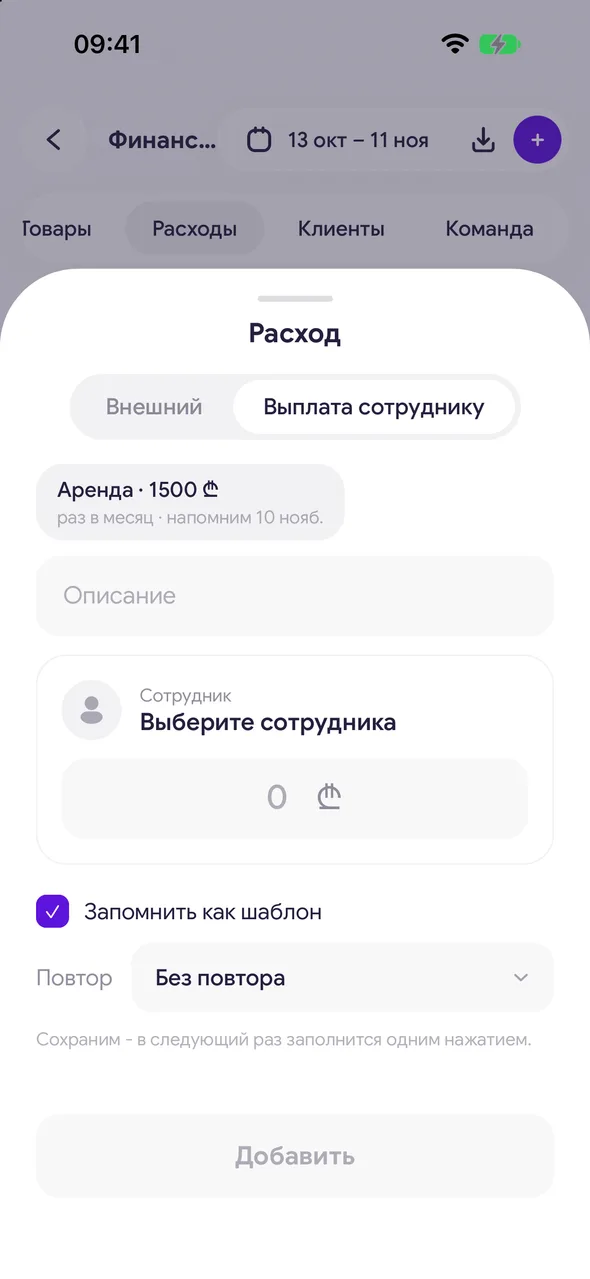
Select «Staff payout»
At the top of the window, switch «External» to «Staff payout» and in the «Employee» field select an employee. The switch is available when the salon has more than one employee.
- 03
Enter the amount and save
Enter the amount and tap «Add». The payout will be recorded under the «Payouts» category.
Good to know
Accruals to the specialist for visits are calculated automatically when a visit is closed - only manually enter what is not related to a visit: salary, bonus, advance.
A summary of payouts for each specialist is on the «Team» tab, sorted by «Payouts».
For salons there is an additional option - the «Money» section with the remaining «to be paid» for each employee and payout «by a specific date» - enabled upon request to support.
In the «Money» section, on the employee's «To pay» tab, expand the visit or accrual and tap «Pay out» - the payout is applied to exactly that line, and the line moves to the «Paid» tab.
The «Payment to employee» operation in «Money» means the money is already with the employee: it is immediately on the «Paid» tab and is not included in the remaining amount to be paid.
Questions and answers
FAQ
How to pay a salary to a specialist in the app?
«Finance & analytics» - «+» - «Expense» - «Staff payout», select the employee and the amount. Percentages for visits are calculated automatically when visits are closed.
See also
Free for a solo master
Try Easy Beezy
Calendar, clients, services and an online booking page - with no time limit. For a salon with a team - 14 days of full access.


