 Easy BeezyApp StoreGoogle PlayRuStoreInstall
Finance and analytics
How to view employee performance
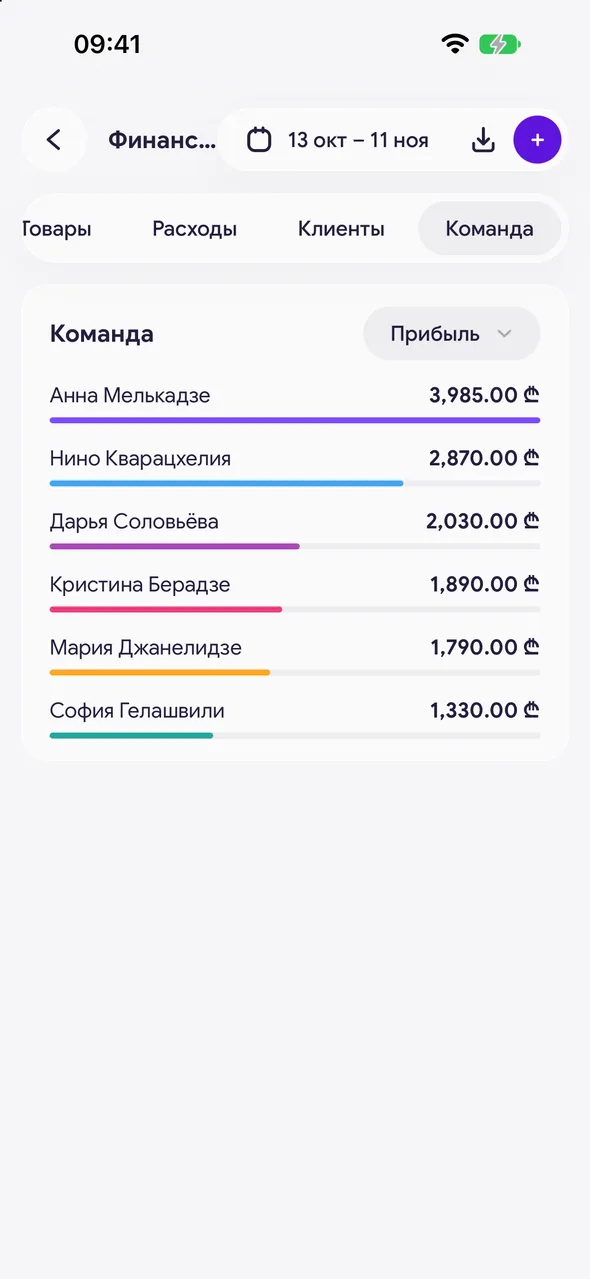
The "Team" tab compares masters: profit from services and goods, payouts, number of services and occupancy.
Step by step
- 01
Open the tab
"Finance & analytics" - "Team". The tab is available when the salon has more than one employee.
- 02
Choose what to compare by
Sorting: "Profit", "Profit from services", "Profit from goods", "Payouts", "Payouts for services", "Payouts for goods", "Services" or "Occupancy".
- 03
Open an employee
Tap a master in the list - their card with earnings and statistics opens.
Good to know
Occupancy shows the share of working time taken up by appointments, with the hours next to it.
Salons have an extra option - client retention per master - enabled on request to support.
Questions and answers
FAQ
How can I see how much a master earned in a month?
"Finance & analytics" - select the period - the "Team" tab, sorted by "Payouts".
See also
Free for a solo master
Try Easy Beezy
Calendar, clients, services and an online booking page - with no time limit. For a salon with a team - 14 days of full access.


