 Easy BeezyApp StoreGoogle PlayRuStoreInstall
Finance and analytics
How to add income or an expense
Rent, coffee purchases, gift certificates and any money outside of visits are entered manually. They go straight into the period's profit.
Step by step
- 01
Tap "+"
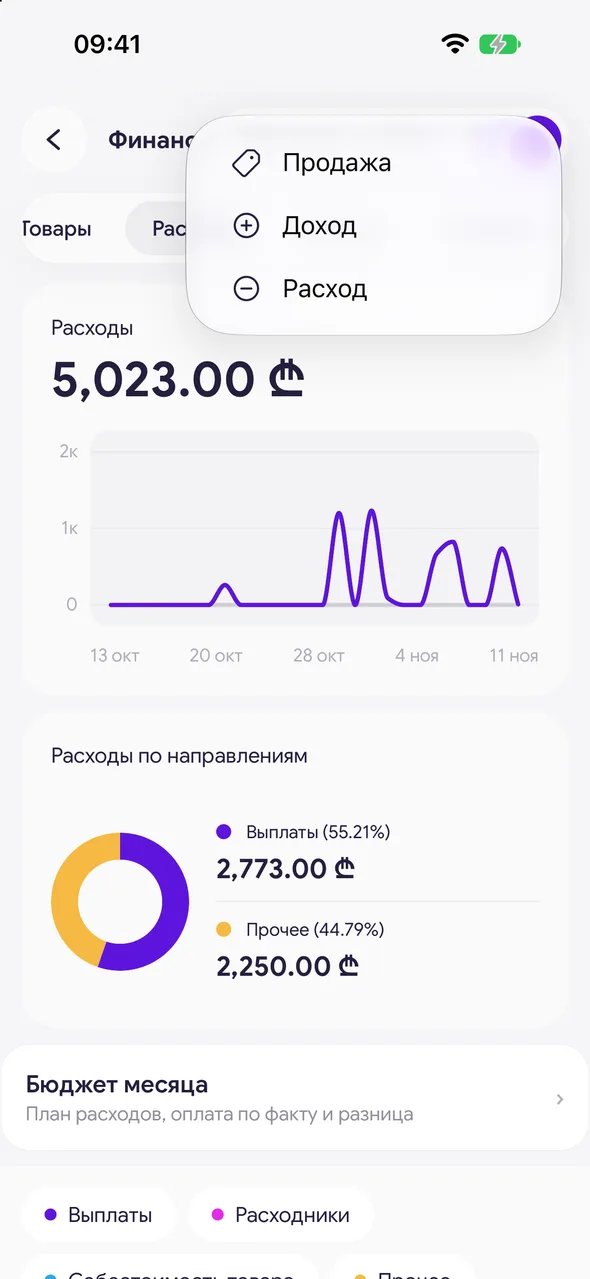
In the header of the «Finance & analytics» section, tap "+" and choose «Income» or «Expense». The «Sale» item is for selling goods from stock.
- 02
Fill it in
The amount and «Description». For income, choose «Payment»: «Cash», «Card» or «Mixed».

- 03
Save
Tap «Add». The transaction will be recorded with today's date and appear in the feed.
Good to know
To edit or delete a transaction, tap it in the feed.
The «Remember as a template» checkbox turns an expense into a template: next time it fills in with one tap.
An employee payout is entered as the same kind of expense - with the «Staff payout» switch.
Questions and answers
FAQ
How do I add rent?
«Finance & analytics» - "+" - «Expense», the amount and the description "Rent". To avoid entering it every month, tick «Remember as a template» and choose the «Every month» repeat.
See also
Free for a solo master
Try Easy Beezy
Calendar, clients, services and an online booking page - with no time limit. For a salon with a team - 14 days of full access.


