 Easy BeezyApp StoreGoogle PlayRuStoreInstall
Cash desk and visits
How the payout to the master for a visit is calculated
When a visit is completed, the app automatically calculates how much the master earned: percentage of services, percentage of sales, and share of tips. The amount is shown in the "Finance" block of the visit.
Step by step
- 01
Set percentages for the employee
In the employee card, specify "Service percentage" and "Percent of goods sold". The percentage of services is calculated automatically in each of their visits, and the percentage of sales is applied when a payout to the employee is added to a sale.
- 02
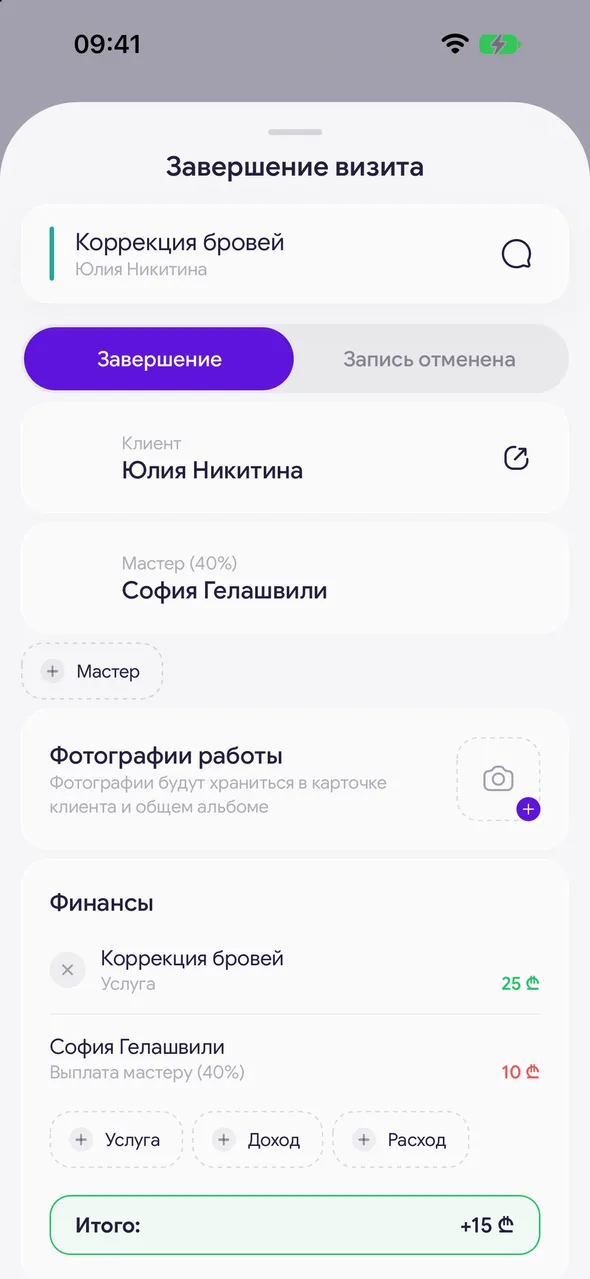
Check the payout when closing
In the "Finances" block, the line "Master payout" with the percentage in parentheses is the amount to the master for services. Payouts from sales and shares of tips appear as separate lines.
- 03
What the master sees
In their visits, the master sees the "My payout" block and the line "Total payout".
Good to know
By default, a visit is calculated using the formula "Standard": The formula accounts for service cost, master commission, extra sales and expenses
If the salon has its own formulas, when closing a visit a field "Calculation formula" appears - a choice of which formula to use. The app remembers the formula you choose most often.
Accruals to the master are visible in the "Finance & analytics" section on the "Team" tab.
The amount can be adjusted after closing: open the visit, in the "Finance" block tap the master's line or "Bank fee" and enter your amount. The calculated one will remain next to it in gray strikethrough.
Questions and answers
FAQ
How to pay the master 40% of services?
Open the employee card and enter 40 in the "Service percentage" field. When each of their visits is completed, the payout will be calculated automatically.
See also
Free for a solo master
Try Easy Beezy
Calendar, clients, services and an online booking page - with no time limit. For a salon with a team - 14 days of full access.


