 Easy BeezyApp StoreGoogle PlayRuStoreInstall
Cash desk and visits
How to set up formulas for calculations
Formulas are needed when the standard "percentage of services" is not enough: payment per capsule, assistant's work, fixed rate. The formula determines which fields the master fills in when closing a visit and how the payout and profit are calculated from them.
Step by step
- 01
Open formulas
"Profile" - "Money" - the gear icon on the right in the header (visible to the owner and those who manage settings). The screen has two tabs: "Formulas" and "Variables".

- 02
Create variables
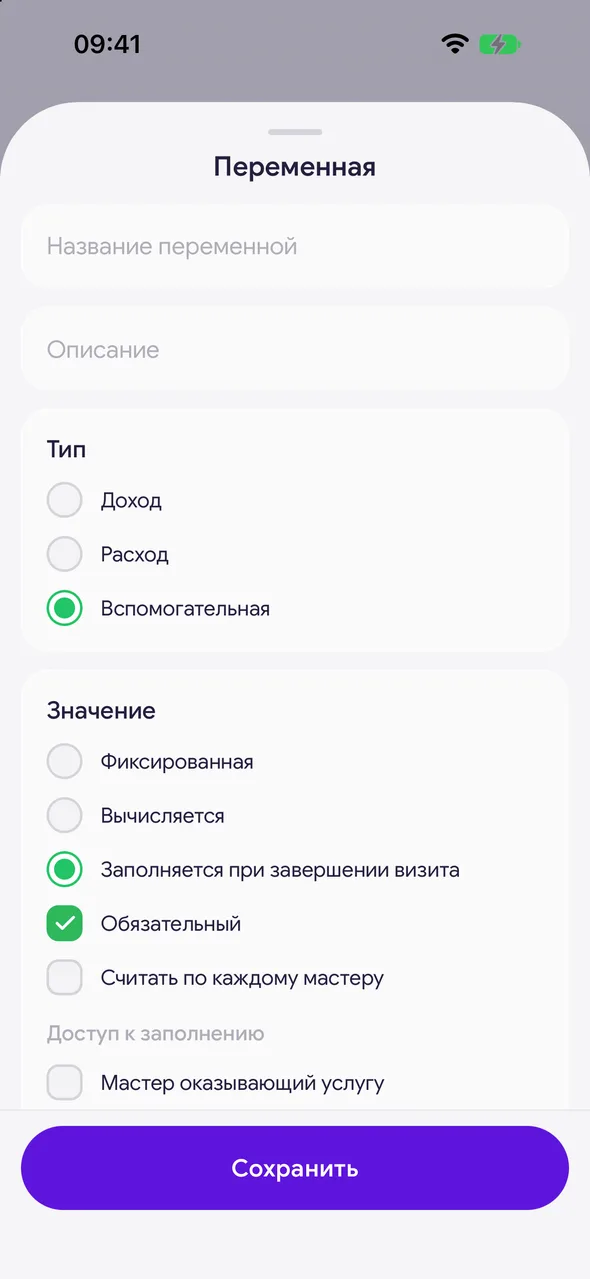
On the "Variables" tab, tap "+". Specify "Variable name", "Type" ("Income", "Expense" or "Auxiliary") and "Value": "Fixed", "Filled in on visit completion" or "Computed".
- 03
Set who fills in and who gets paid
For a variable, you can check "Required", "Per each master" or "List (methods + quantity)". In "Fill-in access", choose who enters the value, and in "Payout" - "No one", "Master providing the service" or "Specific employee".
- 04
Build the formula
On the "Formulas" tab, tap "+", give "Formula name" and "Description". Tap "Add calculation" and compose the calculation from variables and actions. Tap "Save".

- 05
Choose the formula when closing a visit
When the salon has its own formulas, a field "Calculation formula" appears in the visit completion window. The formula's variables will appear there as input fields.
Good to know
To edit or delete a formula or variable, use "⋯" on their card.
Can't set it up? Tap "Get help" at the bottom of the "Formulas" tab: a support chat will open, and they will set up the formulas together with you.
While there are no custom formulas, the formula selection field is not shown in the visit, and everything is calculated using "Standard".
Questions and answers
FAQ
How to pay the master for each capsule?
Create a variable "Number of capsules" with the value "Filled in on visit completion" and a rate variable, then a formula where the payout to the master = quantity × rate. When closing the visit, the master will enter the number of capsules. If it's difficult, tap "Get help".
See also
Free for a solo master
Try Easy Beezy
Calendar, clients, services and an online booking page - with no time limit. For a salon with a team - 14 days of full access.


