 Easy BeezyApp StoreGoogle PlayRuStoreInstall
Calendar
How to view the day as a list
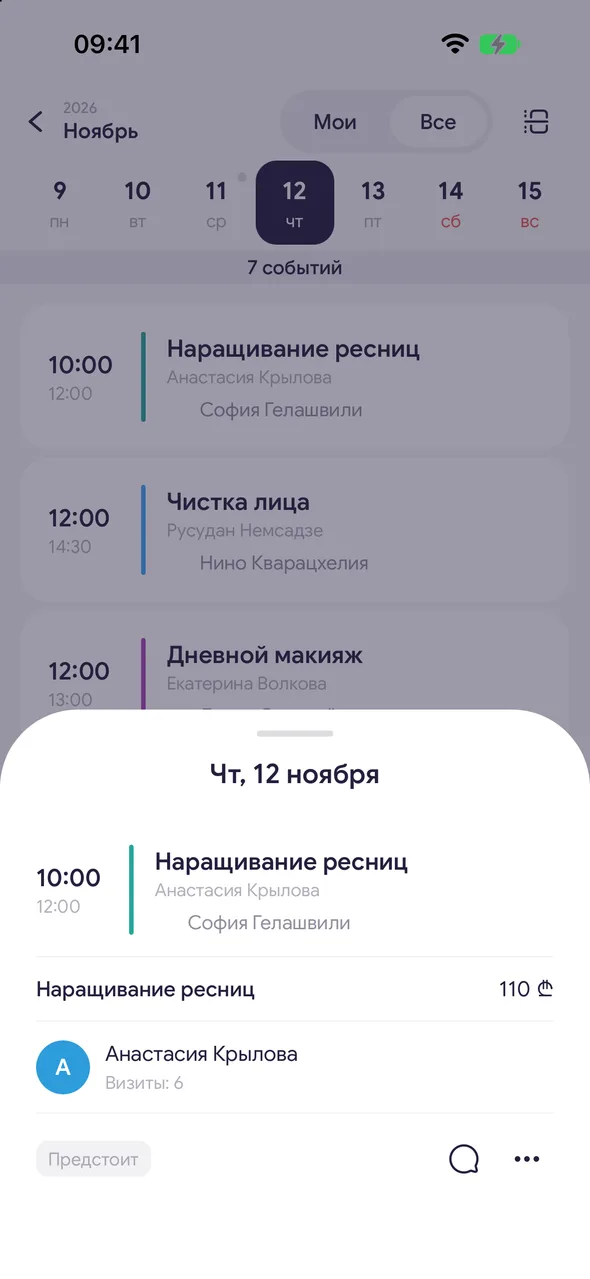
The day list shows all of the day's appointments as cards in order: time, client, services, price. Handy when there are few appointments and you need to see the details.
Step by step
- 01
Open the day
Tap a date in the month. If the day opened by the hour, tap the list icon in the top right corner.

- 02
Scroll through days
Swipe left or right on the list - the next or previous day opens. Above the list there is a week strip: tap a date to go to that day. The strip can also be scrolled.
- 03
Open an appointment
Tap a card - the full appointment opens from the bottom with all actions.
Good to know
Under the week strip you can see how many events are in the day.
Days off and vacations appear first in the list. A day off from the work schedule is shown with the same «Day off» banner.
If there are no appointments, the list shows «No bookings for this day». To book a client, tap «+» at the bottom.
See also
Free for a solo master
Try Easy Beezy
Calendar, clients, services and an online booking page - with no time limit. For a salon with a team - 14 days of full access.


