 Easy BeezyApp StoreGoogle PlayRuStoreInstall
Calendar
How to view the day by hours
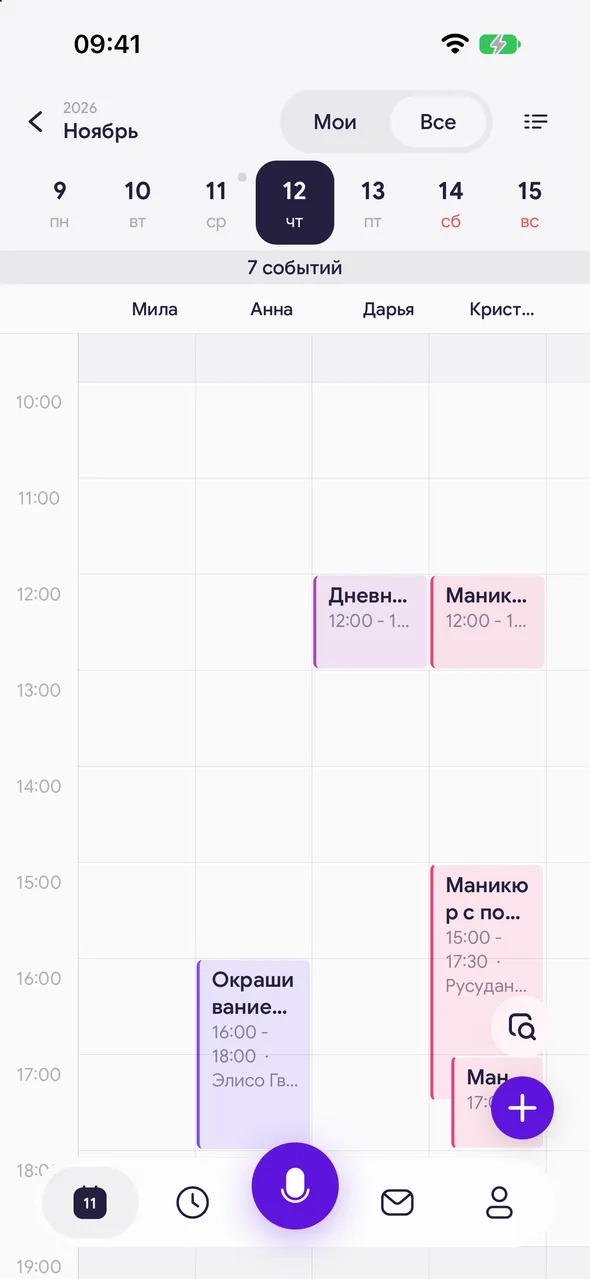
Day by hours - a time scale where appointments are shown as blocks. You can immediately see working hours, breaks, and free slots.
Step by step
- 01
Open the day by hours
Open the day and tap the «Day» icon in the top right. Today opens at the current hour, other days - at the start of working hours.
- 02
Read the scale
Non-working time and breaks are dimmed, working hours are light. The line shows the current time. Below the week strip - the number of events and free windows of the day.
- 03
Book for a time
Tap an empty spot - a new appointment will open for that time with a 15-minute step. Tapping the hour label on the left - an appointment from the start of that hour.
- 04
Actions with an appointment
Tap a block - the appointment card will open. Hold your finger on a block - a menu will open: complete, cancel, edit, delete.
Good to know
Swipe left or right on the scale - the adjacent day.
Appointments that overlap in time are placed side by side, not on top of each other.
A day off and vacation are shown as a banner above the scale.
See also
Free for a solo master
Try Easy Beezy
Calendar, clients, services and an online booking page - with no time limit. For a salon with a team - 14 days of full access.


