 Easy BeezyApp StoreGoogle PlayRuStoreInstall
Bookings
What to do if the booking time is already taken
The app warns you about overlaps: the time is taken by another booking, falls outside the schedule or lands on a day off. The decision is yours.
Step by step
- 01
Warning in the booking
If the selected time overlaps with another booking, a banner «Attention!» appears above the button showing exactly what is in the way.
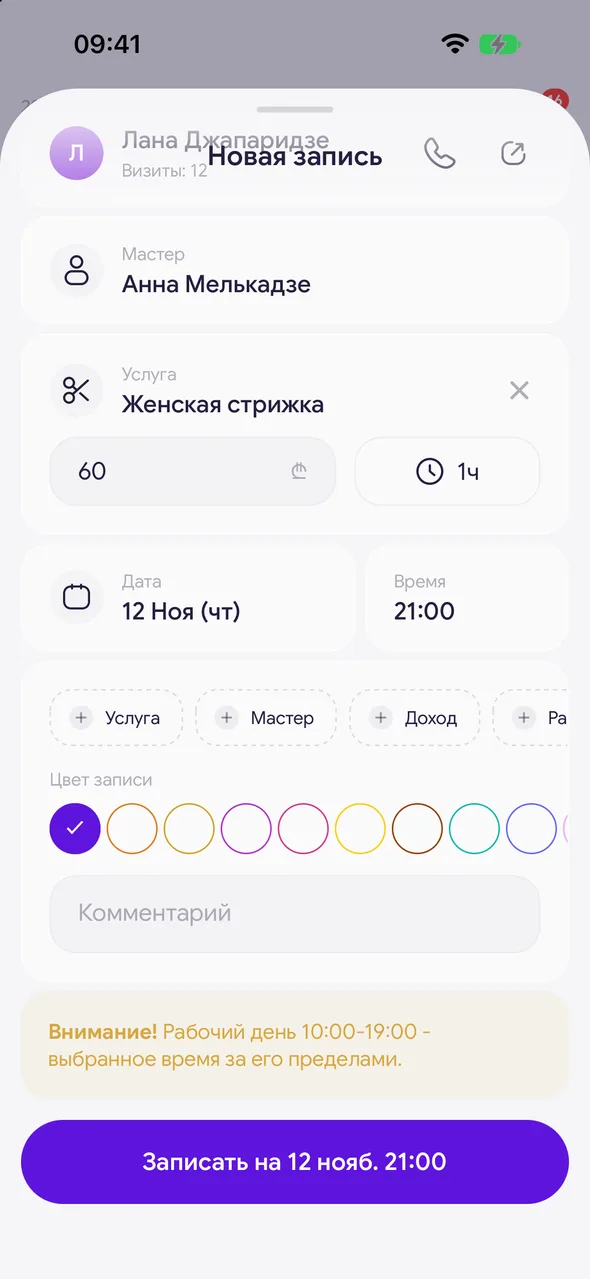
- 02
Window on save
If the time is taken, a window opens on save showing the booking that is in the way. «Create anyway» - save the overlap anyway, «Cancel» - go back and choose another time.
- 03
Outside the schedule
If the time is outside the master's working schedule, the «Outside working hours» window opens. You can still create the booking.
Good to know
Overlapping bookings in the day view are shown side by side in columns, so you can see both bookings.
See also
Free for a solo master
Try Easy Beezy
Calendar, clients, services and an online booking page - with no time limit. For a salon with a team - 14 days of full access.


