 Easy BeezyApp StoreGoogle PlayRuStoreInstall
Calendar
How to view all masters' appointments by columns
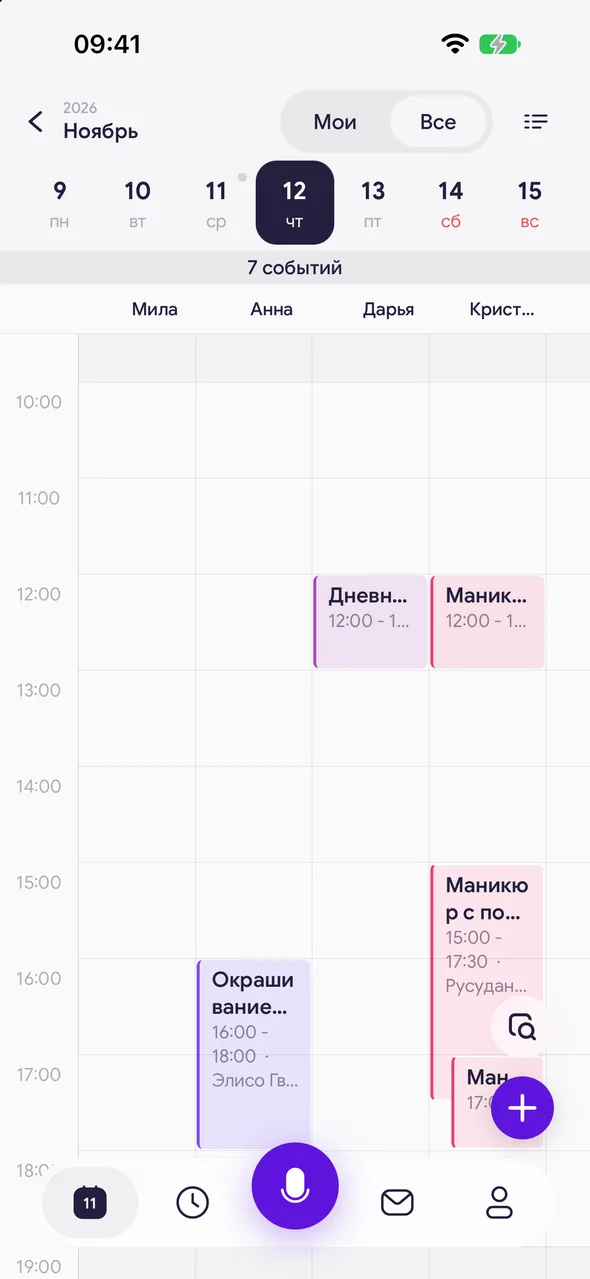
In the day by hours view in «All» mode, each master has their own column - you can see who is busy and who is free at any time.
Step by step
- 01
Open the day by hours
Enable «All» at the top and open the day by hours.
- 02
Master columns
Masters are labeled above the scale, your column is always first. Non-working time is dimmed in each master's column according to their schedule.
- 03
Book with a master
Tap an empty spot in a master's column - a new appointment with them will open for that time.
Good to know
In the day list view in «All» mode there are no columns: appointments are shown in a single list, each labeled with the master.
On a tablet, you can leave only the needed masters on the screen - see the masters panel.
See also
Free for a solo master
Try Easy Beezy
Calendar, clients, services and an online booking page - with no time limit. For a salon with a team - 14 days of full access.


