 Easy BeezyApp StoreGoogle PlayRuStoreInstall
Getting started
How to cancel your subscription
After cancellation, the plan works until the end of the paid period, then it turns off. Your data is not deleted.
Step by step
- 01
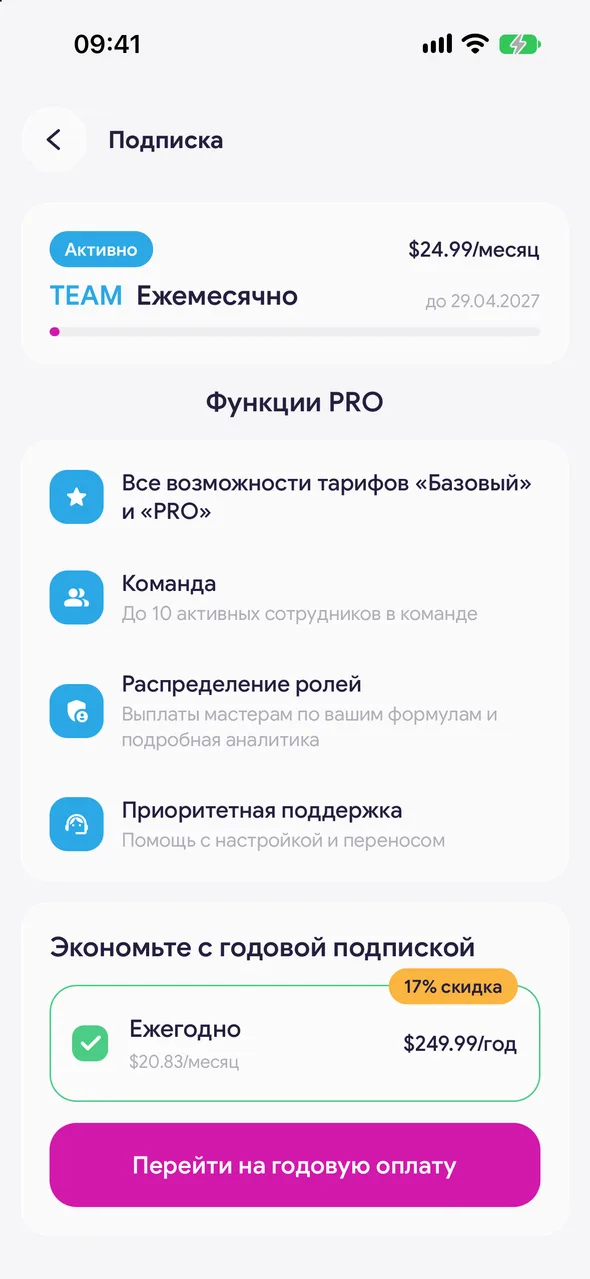
Open the subscription
«Profile» - «Settings» - «Subscription».
- 02
On iPhone
At the bottom of the screen, tap «Manage subscription». App Store subscriptions will open - select Easy Beezy and tap «Cancel Subscription». The same place is in iPhone settings: your name - «Subscriptions».
- 03
On Android
At the bottom of the screen, tap «Cancel subscription». Choose a reason and tap «Cancel subscription» again. Changed your mind - «Keep subscription».
Good to know
On iPhone, cancel no later than 24 hours before the end of the period, otherwise the App Store will have time to charge for the next one.
After cancellation, «Subscription cancelled» and the «Renew subscription» button will appear on the subscription screen - use it to restore the subscription before the end of the period.
A subscription paid on the website can also be cancelled in your lava.top account - the link is sent in the payment email.
Deleting the app or account does not cancel an App Store subscription - cancel it separately.
Questions and answers
FAQ
Will I get a refund for the remaining days?
No, the plan simply works until the end of the paid period. Refunds for an App Store subscription are handled by Apple; for payment on the website, contact Easy Beezy support.
What happens if the renewal payment fails?
The plan keeps working for another 12 hours while the store retries the charge. If the payment still fails, paid sections close, and «Your subscription has ended» with the «Choose a plan» button appears in «Profile».
See also
Free for a solo master
Try Easy Beezy
Calendar, clients, services and an online booking page - with no time limit. For a salon with a team - 14 days of full access.


