 Easy BeezyApp StoreGoogle PlayRuStoreInstall
Getting started
How to switch to annual payment or to the TEAM plan
You can change the payment term or switch from PRO to TEAM on the subscription screen. You don't pay twice for the same period - the store recalculates the plan change.
Step by step
- 01
Open the subscription
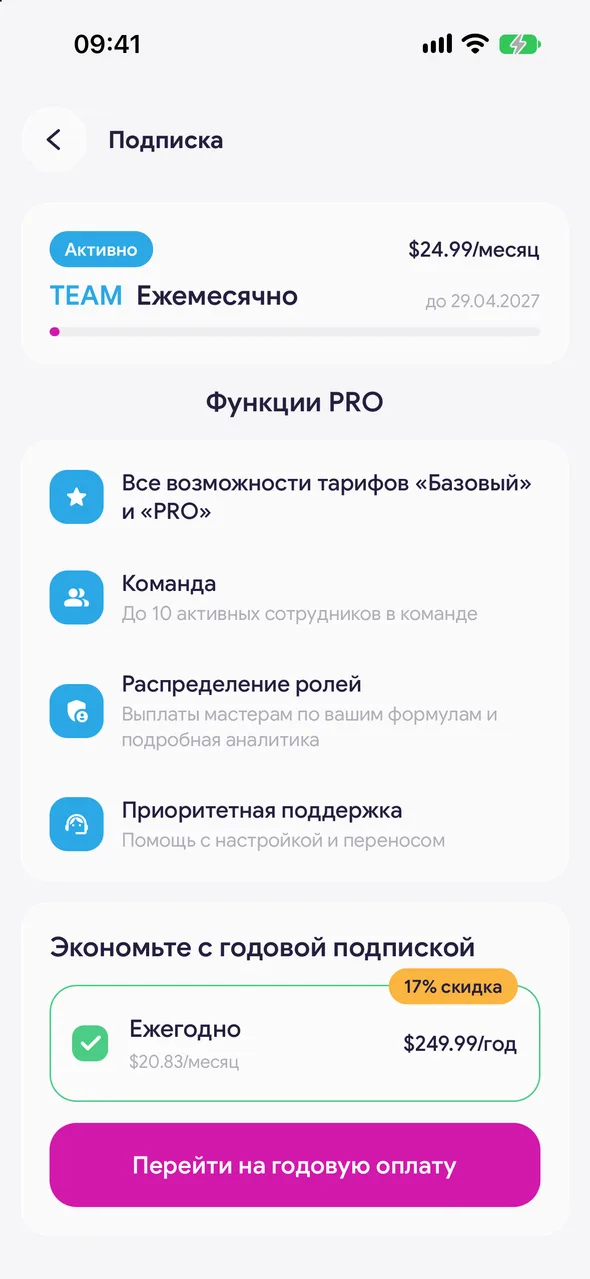
«Profile» - «Settings» - «Subscription». At the top you can see the plan, payment term and next renewal date.
- 02
Switch to annual payment
With monthly payment, there is a «Save with a yearly plan» block below. Tap «Switch to yearly billing». You can switch back with the «Switch to monthly billing» line.
- 03
Switch to TEAM
On the PRO plan, tap the «TEAM plan» card. The TEAM store will open - tap the switch button and confirm payment.
Good to know
The annual payment block is not shown during the trial period or after the subscription is cancelled.
TEAM already includes everything from PRO, so you don't need to buy PRO separately.
See also
Free for a solo master
Try Easy Beezy
Calendar, clients, services and an online booking page - with no time limit. For a salon with a team - 14 days of full access.


