 Easy BeezyApp StoreGoogle PlayRuStoreInstall
Settings and account
How to sign out of your account on other devices
The sign-in list shows which phones and tablets your account is open on. You can close someone else's or an old sign-in.
Step by step
- 01
Open the sign-in list
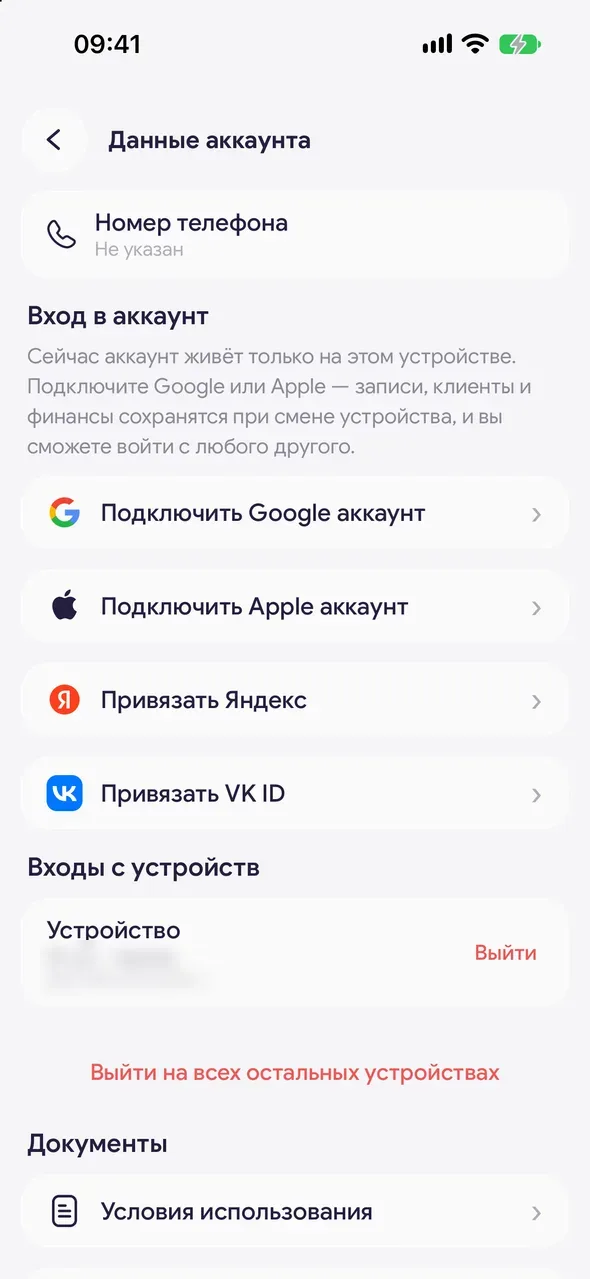
"Settings" - "Account info", "Signed-in devices" block. For each device you can see when and from which city the last sign-in was. The current one is marked "This device".
- 02
Close one sign-in
Next to the device, tap "Sign out" and confirm. That device will need to sign in again.
- 03
Or sign out everywhere
Tap "Sign out of all other devices". This device will stay signed in, the others will need to sign in again.
Good to know
The "Sign out of all other devices" button also closes devices that aren't in the list yet.
Questions and answers
FAQ
I lost my phone. How do I close the account on it?
Sign in on another device and open "Account info" - "Signed-in devices". Tap "Sign out" next to the lost phone or "Sign out of all other devices".
See also
Free for a solo master
Try Easy Beezy
Calendar, clients, services and an online booking page - with no time limit. For a salon with a team - 14 days of full access.


