 Easy BeezyApp StoreGoogle PlayRuStoreInstall
Settings and account
How to change the language, theme and calendar booking view
In the settings you choose the app language, light or dark theme, and what is shown on a booking in the calendar.
Step by step
- 01
Open the preferences
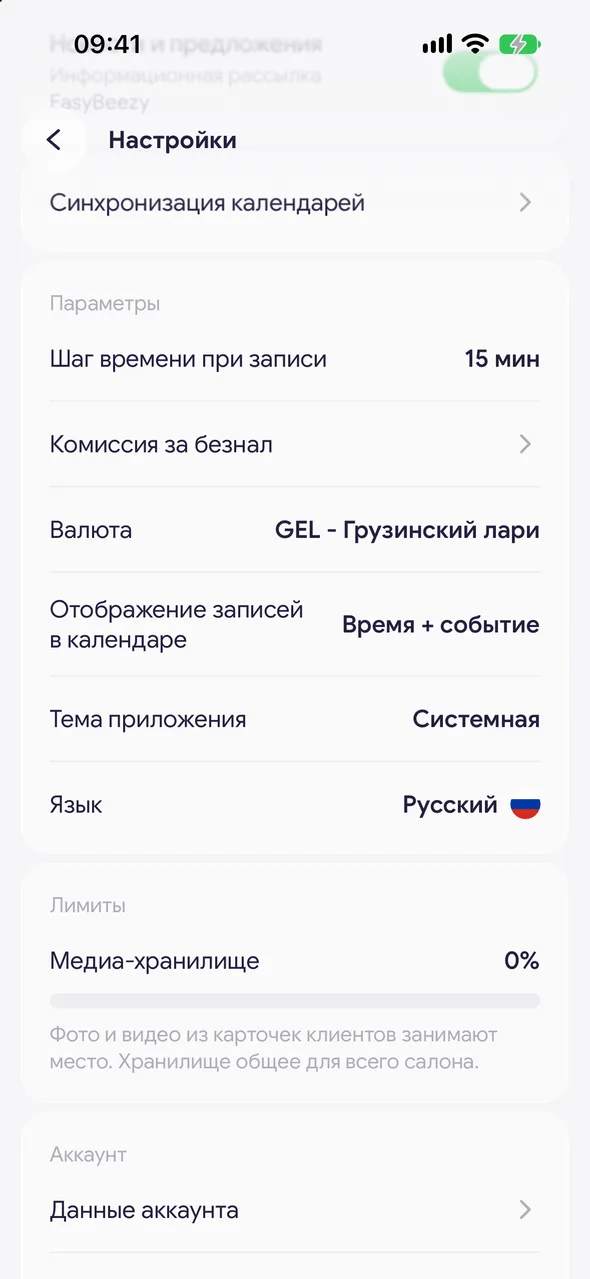
«Profile» - «Settings», group «Preferences».
- 02
Calendar event display
Tap the row and choose: «Time only», «Time + event» or «Event only». This is how bookings will be labelled in the calendar.
- 03
App theme
Choose «Light», «Dark» or «System» - then the theme follows your phone settings.
- 04
Language
Tap «Language» and choose one of the languages: Russian, English, Georgian, Ukrainian, Kazakh, Turkish, Arabic or Hebrew.
Good to know
When you switch to Arabic or Hebrew and back, the app will restart to flip the screen from right to left.
Language and theme are set on each phone separately and do not change for the salon's staff.
See also
Free for a solo master
Try Easy Beezy
Calendar, clients, services and an online booking page - with no time limit. For a salon with a team - 14 days of full access.


