 Easy BeezyApp StoreGoogle PlayRuStoreInstall
Settings and account
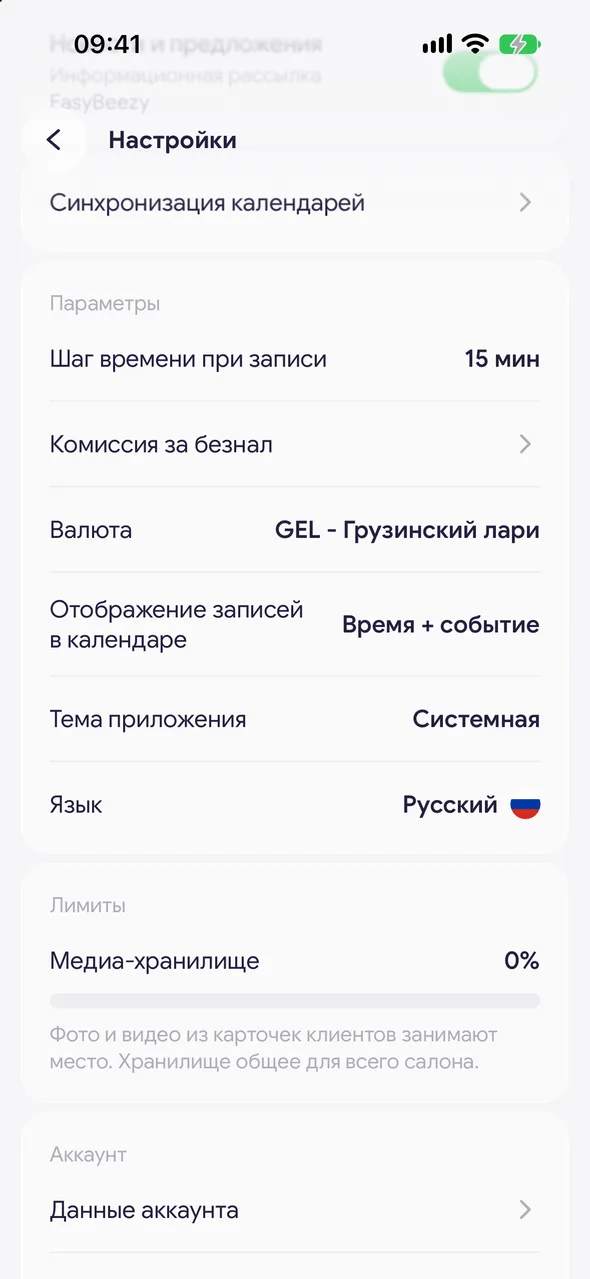
How to change the time step for bookings
The time step is how many minutes apart booking start times can be: 10:00, 10:15, 10:30 and so on. It applies both in the new booking window and on the online booking page.
Step by step
- 01
Open the preferences
«Profile» - «Settings», group «Preferences».
- 02
Choose the step
Tap «Time step when booking» and choose 5, 10, 15, 20, 30 or 60 minutes. The default is 15 minutes.
Good to know
This is also where the owner changes the salon's «Currency». The bank fee for card payments is in the «Money» gear, next to the formulas.
Staff members do not see these rows in the salon: the time step and currency are shared across the whole salon.
Questions and answers
FAQ
Clients can only book on the hour. How do I make it every 15 minutes?
Open «Settings» - «Time step when booking» and choose 15 minutes. The online booking page will start showing times with this step.
Free for a solo master
Try Easy Beezy
Calendar, clients, services and an online booking page - with no time limit. For a salon with a team - 14 days of full access.


