 Easy BeezyApp StoreGoogle PlayRuStoreInstall
Reminders and messages
How to ask for a review after a visit
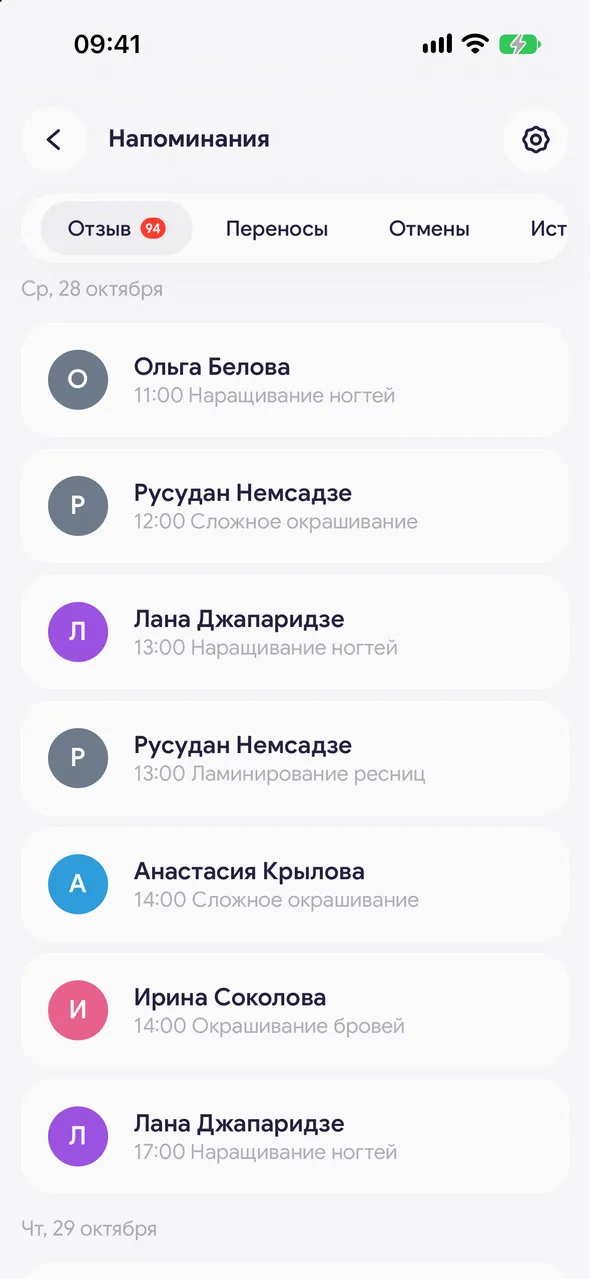
After a visit, the client appears in the "Review" section: one message with a thank-you and a link is the easiest way to collect ratings.
Step by step
- 01
Open the section
"Reminders" - "Review". Here you'll see clients who have recently had a visit. How many days after the visit to keep a client in the list is set in the "Show after the visit ends" row above the list.
- 02
Send a thank-you
Tap the client. The text contains a thank-you and a link where the client can leave a review. Choose a messenger and mark it as sent.
Good to know
The link leads to your online booking page - that's where the client leaves a review. If online booking is disabled, only the thank-you is sent, without a link.
The text is the "Ask for a review" template in "Reminder settings".
Questions and answers
FAQ
How do I get more reviews from clients?
Write on the same day while the impression is fresh: "Reminders" - "Review", tap the client and send the ready-made request with the link.
See also
Free for a solo master
Try Easy Beezy
Calendar, clients, services and an online booking page - with no time limit. For a salon with a team - 14 days of full access.


