 Easy BeezyApp StoreGoogle PlayRuStoreInstall
Migrating from other services
How to transfer your database from another app
You can upload clients yourself from a file in just a couple of minutes. We transfer visit history and your price list - send the export to our support email.
Step by step
- 01
Export your database from the old service
Find the client export to a file in the old app - usually Excel or CSV. How to do this in DIKIDI, Altegio, Masters and other services is covered in the other articles in this section.
- 02
Option 1: upload the file yourself
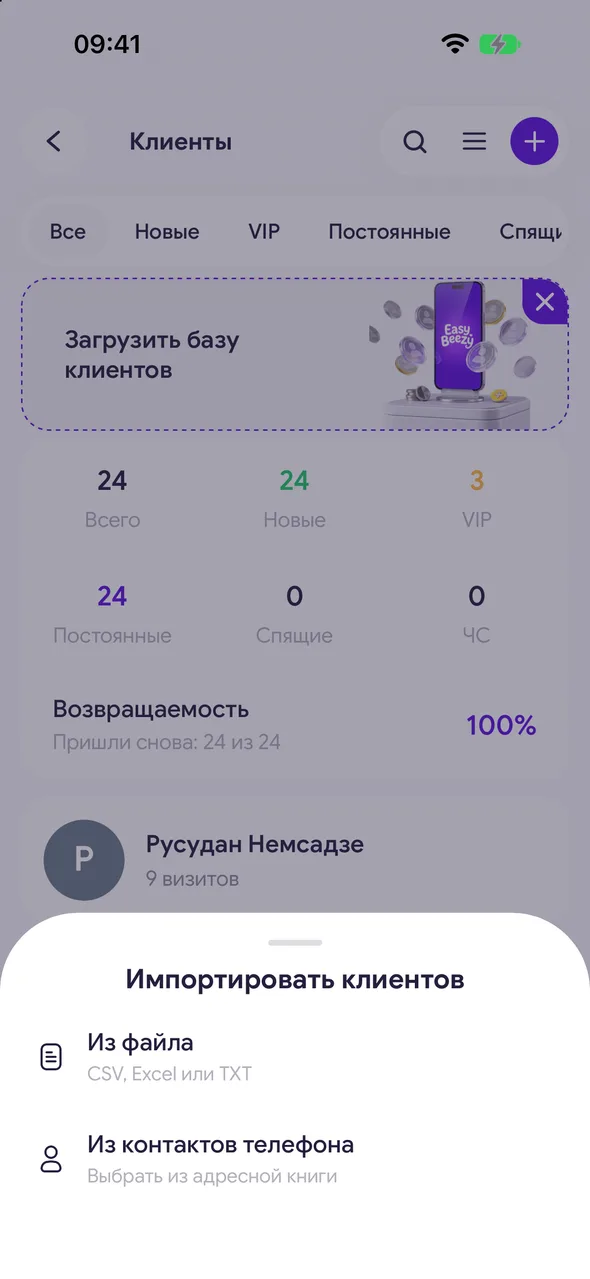
«Profile» - «Clients» - the menu button in the top right - «Import client base» - «From file». Excel (.xlsx, .xls), CSV and TXT files are supported.
- 03
Option 2: send the file to us
Send the file to [email protected] and include the phone number your account is registered to. We will upload the clients ourselves, and if the file contains visit history, we will transfer that too.
Good to know
The support chat in the app («Profile» - «Help») only accepts images - send files to [email protected].
Visit history cannot be transferred manually - we do it from the file you send.
You can upload your price list yourself: from a link to your page in the old service, from a photo or from a file.
In the first week after signing up, «Profile» shows a «Switching from another app?» card - the «Move my data» button opens a chat with support.
Questions and answers
FAQ
Can I transfer clients from another program?
Yes. Export your clients to a file and upload it in «Clients» - «Import client base», or send the file to [email protected] and we will upload it for you.
Will clients be duplicated if I upload the file a second time?
No: clients with a phone number already in the database are not added again.
See also
Free for a solo master
Try Easy Beezy
Calendar, clients, services and an online booking page - with no time limit. For a salon with a team - 14 days of full access.


