 Easy BeezyApp StoreGoogle PlayRuStoreInstall
Finance and analytics
How to break down expenses by category
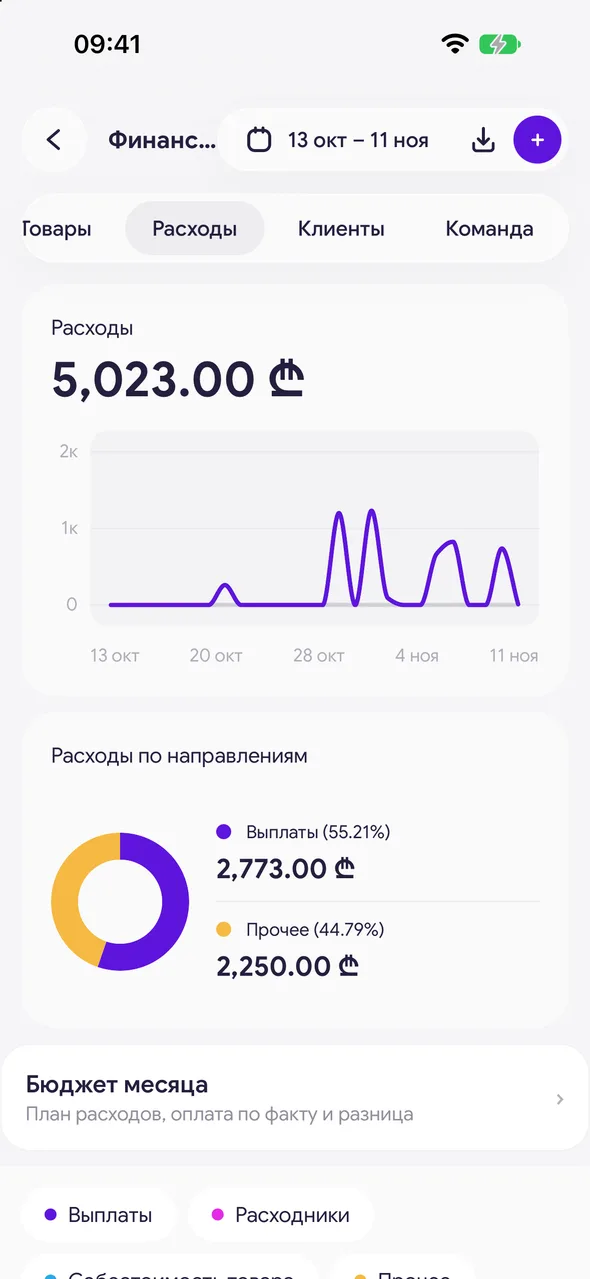
The Expenses tab shows where the money went: payouts, supplies, cost of goods sold and more.
Step by step
- 01
Open the tab
«Finance & analytics» - «Expenses». At the top - «Expenses by direction» with the total for each category.
- 02
Filter the feed
Tap the «Payouts», «Supplies», «Cost of goods» or «Other» chip - only those expenses will remain in the feed. Tap again to remove the filter.
Good to know
«Supplies» - the cost of materials written off in visits; «Cost of goods» - the purchase price of goods sold.
This is also where you open «Monthly budget» - your monthly expense plan.
Questions and answers
FAQ
Why is there a "Cost of goods" expense when I didn't buy anything?
It is the purchase price of goods sold during the period: a sale brings in revenue, and its cost goes into expenses so that profit is accurate.
See also
Free for a solo master
Try Easy Beezy
Calendar, clients, services and an online booking page - with no time limit. For a salon with a team - 14 days of full access.


