 Easy BeezyApp StoreGoogle PlayRuStoreInstall
Cash desk and visits
How to change services, price, and masters in a visit
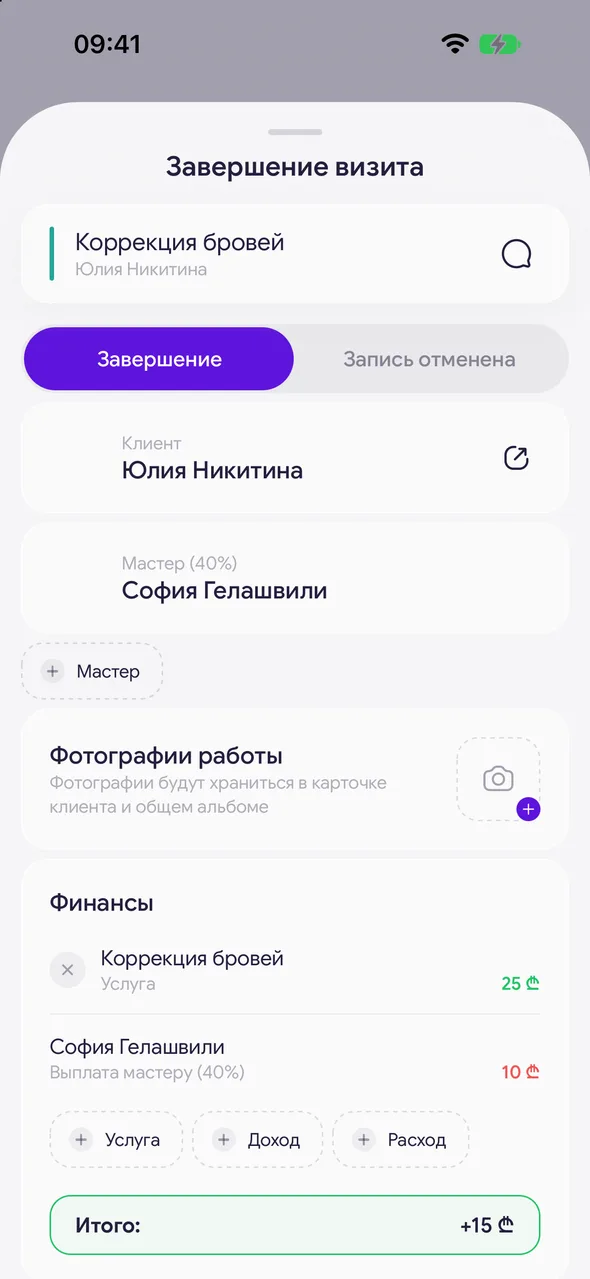
When closing a visit, you can replace a service, adjust the price, add another service or a second master - exactly as it actually happened.
Step by step
- 01
Replace a service
In the «Finances» block, tap the service name and select another from the list.
- 02
Adjust the price
Tap the service amount and enter a new one. The previous price will remain next to it, crossed out - so you can see that a discount or markup was made manually.
- 03
Add or remove a service
«Service» adds another service. The cross to the left of the row removes the service from the visit.
- 04
Add a master
If two people worked on the client, tap «Master» and select an employee. Each master has their own card and their own payout; the second master can be removed with the cross.
Good to know
The «Master» button is visible only when there is more than one employee in the salon.
A visit with multiple masters is counted once in the cash desk and finances - revenue is not doubled.
Questions and answers
FAQ
The client took an additional service on the spot - how to account for it?
When completing the visit, tap «Service» in the «Finances» block and select the service. You can adjust the price by tapping the amount.
See also
Free for a solo master
Try Easy Beezy
Calendar, clients, services and an online booking page - with no time limit. For a salon with a team - 14 days of full access.


