 Easy BeezyApp StoreGoogle PlayRuStoreInstall
Calendar
How to view the week
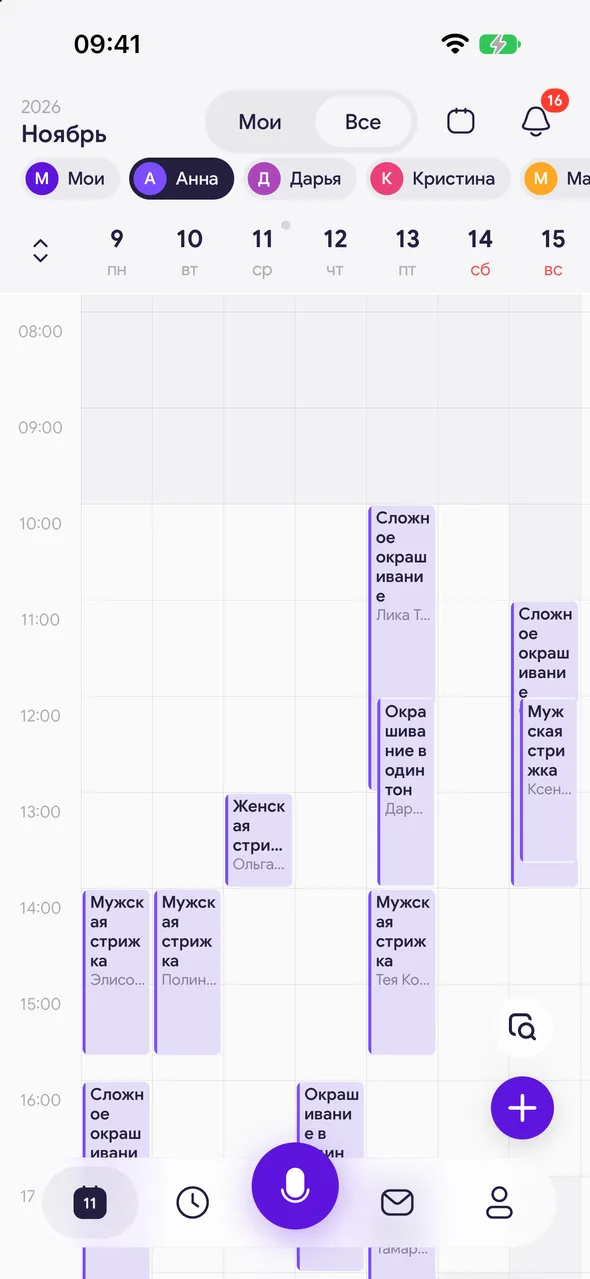
The week is seven columns with an hour timeline: you can see where it is busy and where there is room for an appointment.
Step by step
- 01
Open the week
In the month, tap the «Calendar view» icon in the top right corner.
- 02
Scroll through weeks
Swipe left or right on the timeline - the neighbouring week opens. Swipe up and down - the hours of the day.
- 03
Book a free slot
Tap an empty spot in a day column - a new appointment opens for that day and time. Tapping an appointment opens its card.
- 04
Open a day
Tap the date in the week header - that day opens as a list or by the hour.
Good to know
In a salon, the week shows one master's schedule. In «All» mode there is a strip of masters above the dates: tap a master to see their week. Your choice is remembered. In «Mine» mode you see your own week.
Days off and vacations are shown as a bar above the timeline - they last all day.
The calendar button to the left of the dates opens a picker for any date.
See also
Free for a solo master
Try Easy Beezy
Calendar, clients, services and an online booking page - with no time limit. For a salon with a team - 14 days of full access.


