 Easy BeezyApp StoreGoogle PlayRuStoreInstall
Calendar
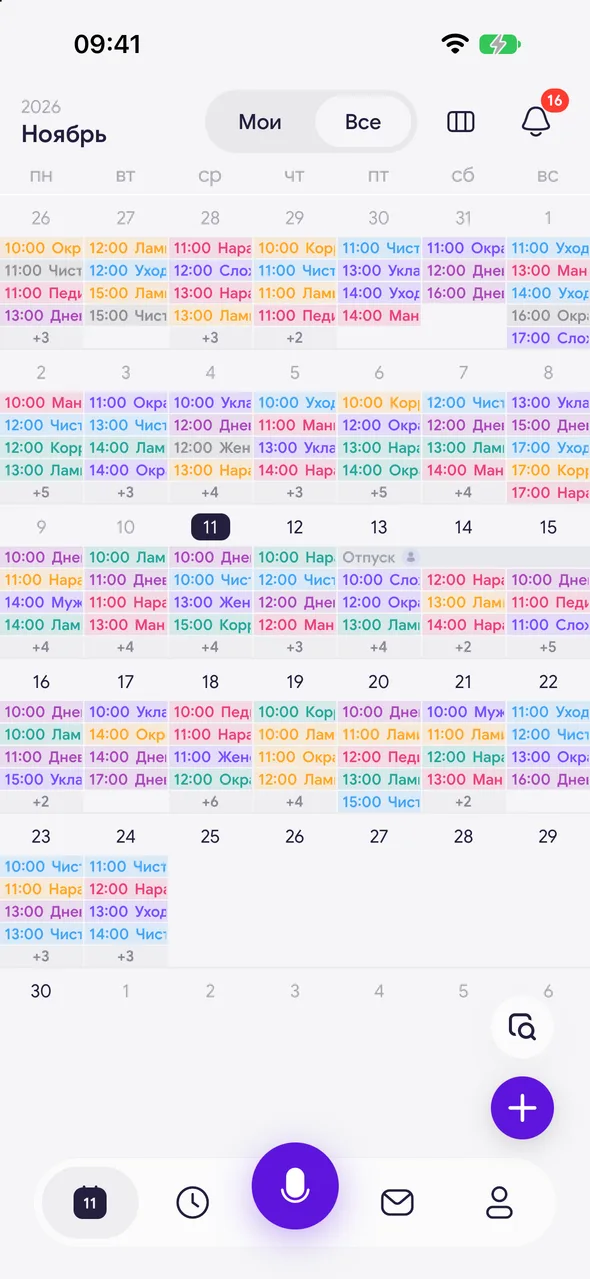
How to switch between «My» and «All» appointments
In the salon, the calendar shows either only your appointments or the appointments of the whole team.
Step by step
- 01
Toggle in the header
At the top of the calendar, tap «Mine» or «All». The toggle is available in month, week, and day views.
- 02
What changes
«Mine» - only your appointments and your work schedule. «All» - appointments of all masters, each appointment is labeled with the master.
Good to know
In the month view, you can also switch by swiping on the grid: left - «All», right - «Mine».
The «+» button in «Mine» mode books an appointment with you.
Questions and answers
FAQ
Why doesn't the master have the «All» toggle?
The master sees only their own appointments - this is by design due to permissions. The owner, administrator, and manager can see team appointments.
See also
Free for a solo master
Try Easy Beezy
Calendar, clients, services and an online booking page - with no time limit. For a salon with a team - 14 days of full access.


