 Easy BeezyApp StoreGoogle PlayRuStoreInstall
AI administrator
How to choose the assistant's operating mode
The mode decides whether the assistant can book on its own or only answers questions.
Step by step
- 01
Open the «Mode» block
«Profile» - «Online booking» - «AI administrator».
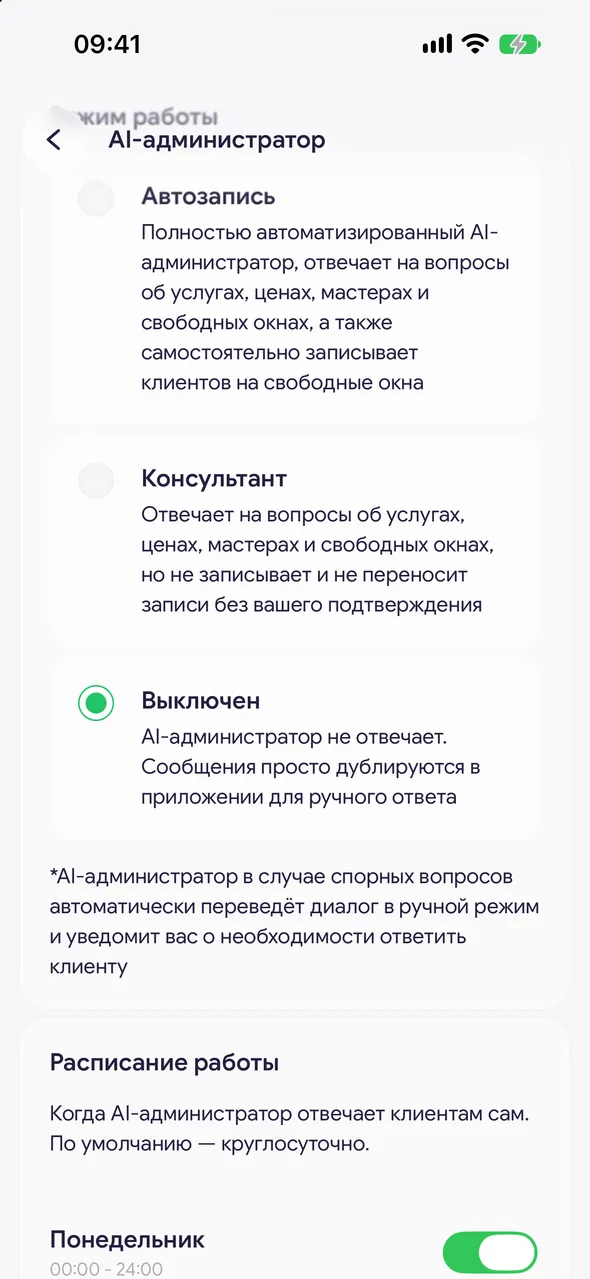
- 02
Auto-booking
A fully automated AI administrator: answers questions about services, prices, masters and free slots, and books clients into free slots on its own.
- 03
Advisor
Answers questions about services, prices, masters and free slots, but doesn't book or reschedule without your confirmation. Bookings from the assistant arrive to you as requests in «Requests & messages».
- 04
Off
The AI administrator does not reply. Messages are simply mirrored into the app for a manual reply.
Good to know
Until a bot is connected, you cannot choose «Auto-booking» or «Advisor» - the app will remind you with «Connect a bot first».
*In disputed cases the AI administrator automatically switches the chat to manual mode and notifies you that a client needs a reply
Questions and answers
FAQ
Which mode should I choose to start with?
«Advisor»: the assistant answers questions and offers times, and you confirm every booking yourself. Once you are sure it replies the way it should, switch to «Auto-booking».
See also
Free for a solo master
Try Easy Beezy
Calendar, clients, services and an online booking page - with no time limit. For a salon with a team - 14 days of full access.


