 Easy BeezyApp StoreGoogle PlayRuStoreInstall
AI administrator
How to set when the assistant replies
By default the assistant replies around the clock. You can leave it, for example, only the night and weekends, and reply yourself during the day.
Step by step
- 01
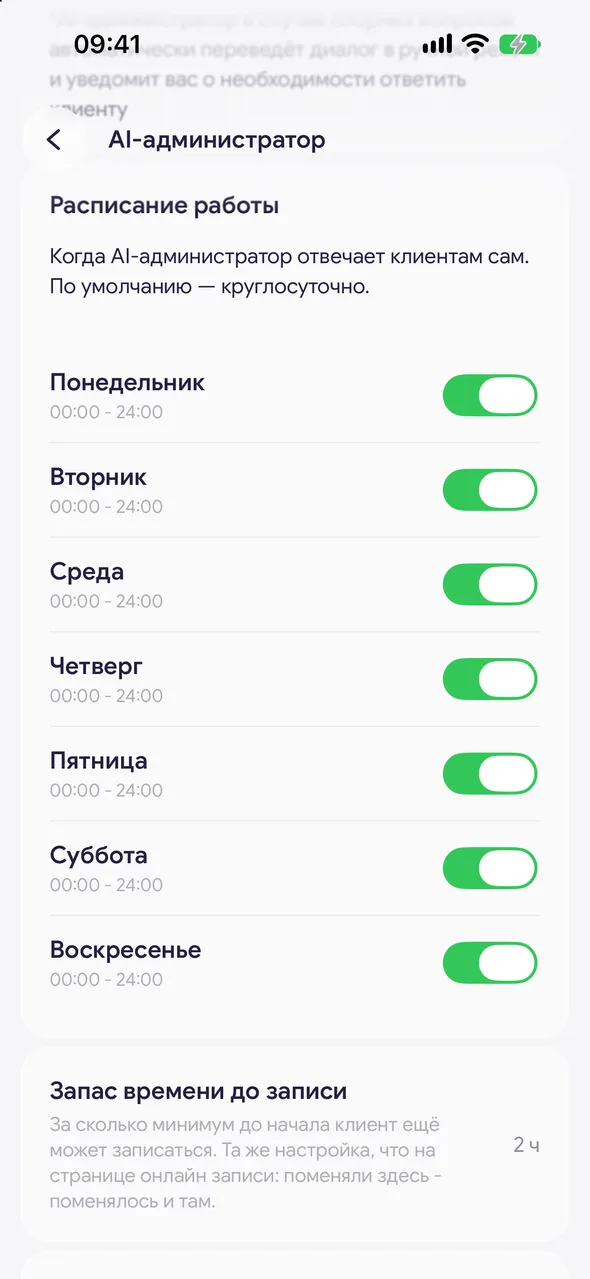
Open «Work schedule»
The block on the «AI administrator» screen. When the AI admin replies to clients on its own. Around the clock by default.
- 02
Tick the days
The switch next to a day turns the assistant on or off for that day of the week.
- 03
Set the hours
Tap a day and specify the start and end. It is saved immediately.
Good to know
Outside the schedule the assistant stays silent, and client messages wait for your reply in the «Messages» tab.
Below on the same screen is «Lead time before a booking»: how long before the start the assistant and the booking page still book a client. This is one shared setting.
Questions and answers
FAQ
The assistant replied at night even though I did not turn it on for the night.
Check «Work schedule»: if nothing has been set there, the assistant works around the clock. Hours are counted by the salon's time zone.
Free for a solo master
Try Easy Beezy
Calendar, clients, services and an online booking page - with no time limit. For a salon with a team - 14 days of full access.


