 Easy BeezyApp StoreGoogle PlayRuStoreInstall
Inventory
How to write off materials in a visit
Materials used for the service are written off from stock when the visit is completed. You can set them in the service in advance - then the write-off is filled in automatically.
Step by step
- 01
Set the norms in the service
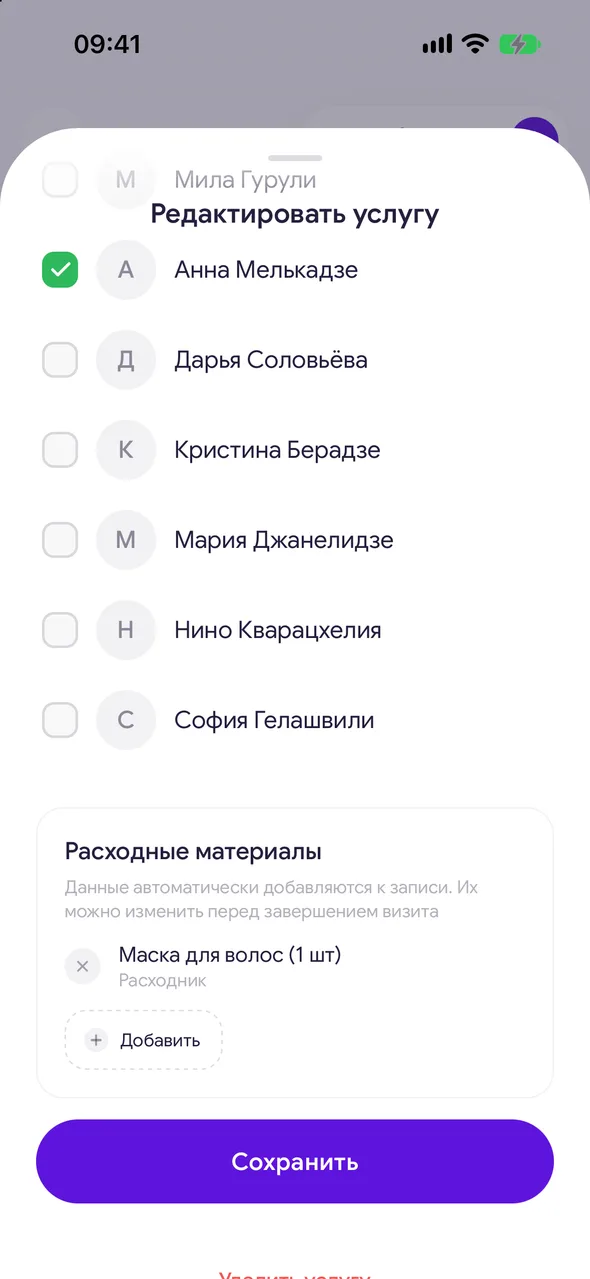
Open the service: «Profile» - «Services» - the service you need. In the «Supplies» block, tap «Add», select a material from stock and how much is used per service. They are added to the booking automatically. You can change them before closing the visit.
- 02
Check when closing the visit
In the visit completion window, in the «Finances» block, the norms appear as «Consumable from stock» lines. Adjust the quantity if more or less was used.
- 03
Add a material manually
«Out» - «Consumable from stock», select the material and quantity.
- 04
Complete the visit
The materials will be written off from stock, and their cost will reduce the visit's profit. The cash desk balance does not change - the material was paid for at purchase.
Good to know
While there are no norms, nothing is written off - add them gradually, one service at a time.
Cancelling a completed visit returns the written-off materials to stock.
How many materials were used over a period can be seen in «Finance & analytics» - «Expenses» - «Supplies».
Questions and answers
FAQ
How do I make the color write off automatically?
Open the coloring service and in the «Supplies» block add the color and the quantity per service. It will be written off from stock each time a visit is completed.
See also
Free for a solo master
Try Easy Beezy
Calendar, clients, services and an online booking page - with no time limit. For a salon with a team - 14 days of full access.


