 Easy BeezyApp StoreGoogle PlayRuStoreInstall
Reminders and messages
How to buy an SMS package
SMS are bought in packages for the country whose numbers they will be sent to. Purchased messages do not expire.
Step by step
- 01
Open the purchase screen
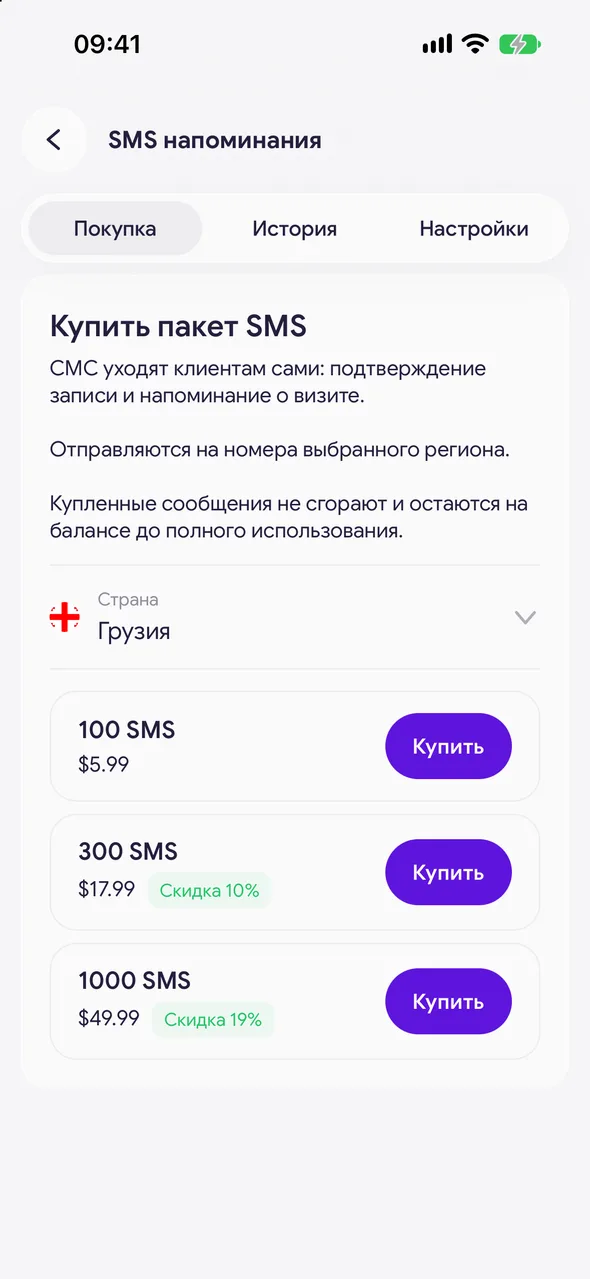
«Automatic notifications» - «Buy» tab. If packages have already been purchased, the remaining balance for each country is shown at the top.
- 02
Choose a country and package
In the «Country» line, choose the destination. Below are the packages with the number of SMS, the price and the volume discount.
- 03
Pay
Tap «Buy». On iPhone, payment goes through the App Store; on Android, the payment page will open. The messages will appear on your balance a few seconds after payment.
Good to know
A package for one country is only used for numbers in that country: a Georgian package cannot be sent to a Belarusian number.
If payment through the App Store fails, a «Payment not going through? Pay by card» link may appear on iPhone.
Questions and answers
FAQ
What happens when the SMS run out?
Automatic messages will stop being sent until you top up your balance. Bookings and the rest of the app work as usual.
See also
Free for a solo master
Try Easy Beezy
Calendar, clients, services and an online booking page - with no time limit. For a salon with a team - 14 days of full access.


