 Easy BeezyApp StoreGoogle PlayRuStoreInstall
Online booking
How clients find you in the catalog
Specialist and salon pages are collected in a catalog on easybeezy.net: clients search by city, service and on the map. Listing there is free.
Step by step
- 01
Enable online booking
The catalog only includes pages that can be booked: the toggle in the «Online booking» block must be set to «Active».
- 02
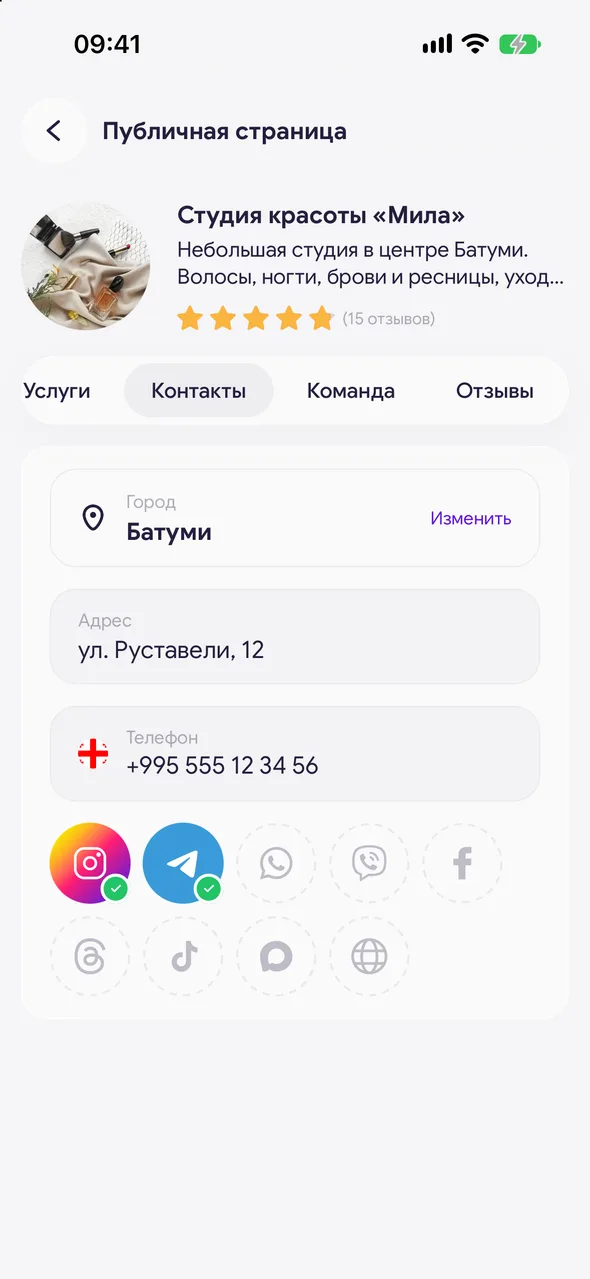
Specify city and address
The «Contacts» tab: city from the list and exact address. They place the page on the map; without them it won't appear in the catalog.
- 03
Open at least one service
The page must have at least one active service.
- 04
Make the page noticeable
Photos in the slider, description, «About us» text, prices and reviews - all this is visible in the catalog and helps clients choose you.
Good to know
Pages on PRO and TEAM plans (and during the trial period) rank higher in the catalog than free ones.
The page is open to Google, Yandex and AI search engines. Disabled booking doesn't remove it from search, but a deleted page does.
A client can add you to favorites on the website to find you quickly later.
Questions and answers
FAQ
Why am I not in the catalog?
Check three things: online booking is enabled, city and address are specified in «Contacts», and the page has at least one service. A deleted page doesn't appear in the catalog.
Free for a solo master
Try Easy Beezy
Calendar, clients, services and an online booking page - with no time limit. For a salon with a team - 14 days of full access.


