 Easy BeezyApp StoreGoogle PlayRuStoreInstall
Finance and analytics
How to view client analytics
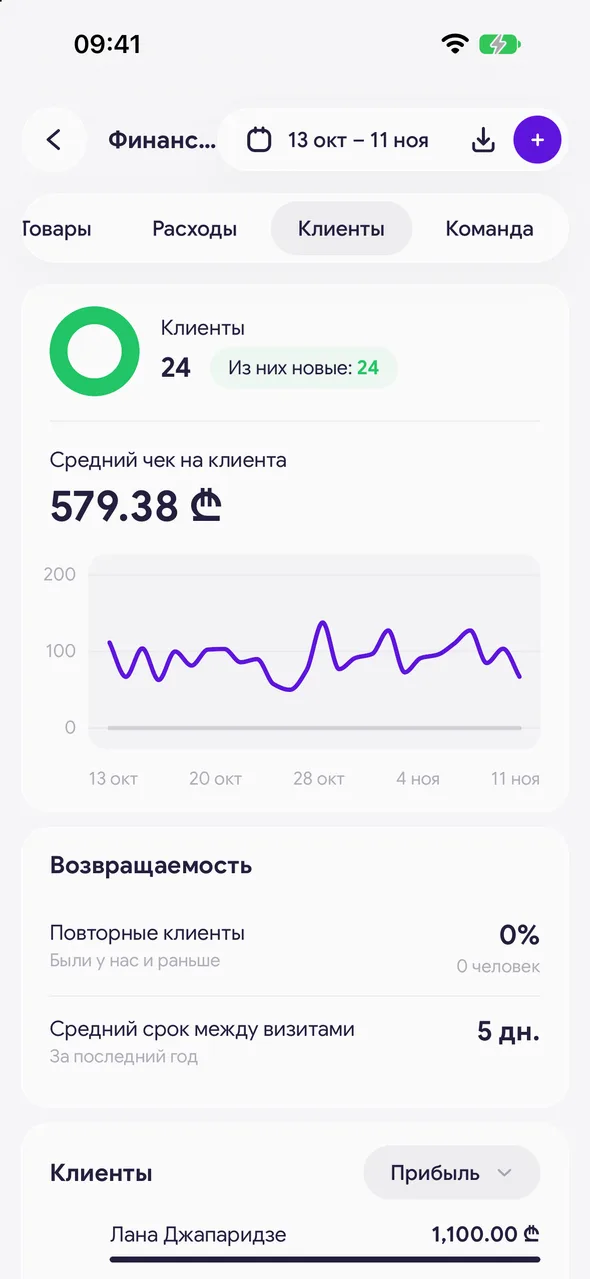
The "Clients" tab shows how many people came during the period, how many of them are new, the average ticket, retention and your most valuable clients.
Step by step
- 01
Open the tab
"Finance & analytics" - "Clients". At the top - the number of clients for the period, "New among them:" and "Average check per client" with a chart.
- 02
Check retention
The retention card shows whether clients come back.
- 03
Client list
Clients of the period with sorting, for example by profit. Tap a client to open their card.
- 04
Base breakdown
At the bottom - the base broken down by groups. Tapping a group opens the list of those clients.
Good to know
Salons have extra options - referral analytics ("who brought whom") and consultation tracking - enabled on request to support.
Questions and answers
FAQ
How many new clients came this month?
"Finance & analytics" - "Clients", select the period in the header. The "New among them:" row - new clients.
Free for a solo master
Try Easy Beezy
Calendar, clients, services and an online booking page - with no time limit. For a salon with a team - 14 days of full access.


