 Easy BeezyApp StoreGoogle PlayRuStoreInstall
Clients
How to view a client's history
The «History» tab in the client card shows all their visits and front-desk purchases, in the same form as in the «Visits» section.
Step by step
- 01
Open the history
In the client card, open the «History» tab. Visits and purchases are grouped by day, newest first, and upcoming visits are here too. A product held for the client with a deposit is also here: expand the card - it has the «Edit» and «Hand over» buttons. «Hand over» first shows the whole order: when and by whom it was held, how much was paid and how much is left, the payout to the master - and from there the product is handed over.
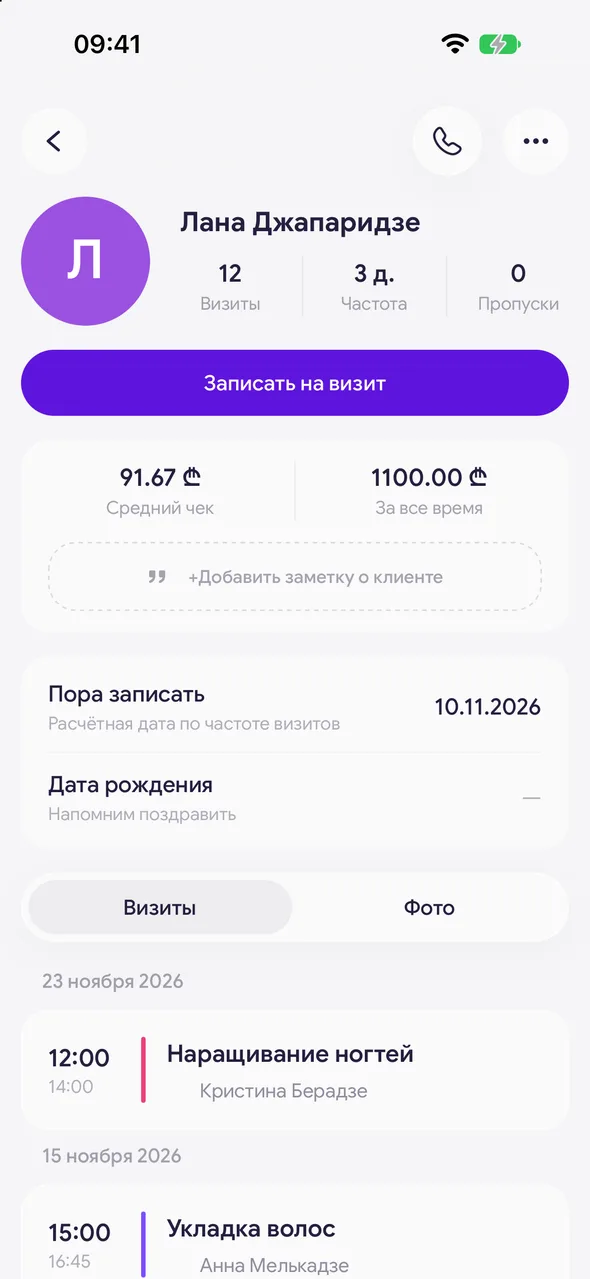
- 02
Expand a visit
Tap the visit card: underneath is the client's bill - services, products and the amount due. The button at the bottom opens the visit as in the «Visits» section. An unclosed visit is marked «Awaiting completion», and one closed by the master but not yet checked is marked «Awaiting confirmation».

- 03
Purchases
A product sold to the client from the front desk without a visit appears as a separate line on its day. Expand it to edit the sale.
Good to know
In a salon with a team, the master is shown on the visit.
A master cannot delete a client's appointment - only cancel it.
Questions and answers
FAQ
Why are there fewer visits in the header than in the tab?
The header counts only past visits. Future appointments and no-shows are visible in the tab but are not included in the count.
See also
Free for a solo master
Try Easy Beezy
Calendar, clients, services and an online booking page - with no time limit. For a salon with a team - 14 days of full access.


