 Easy BeezyApp StoreGoogle PlayRuStoreInstall
Cash desk and visits
How to enable auto-completion of visits
If you don't want to close each visit manually, the app will do it automatically right after the service ends.
Step by step
- 01
Open the cash desk menu
"Profile" - "Cash register" - the "⋯" menu in the header - "Auto-close visits".
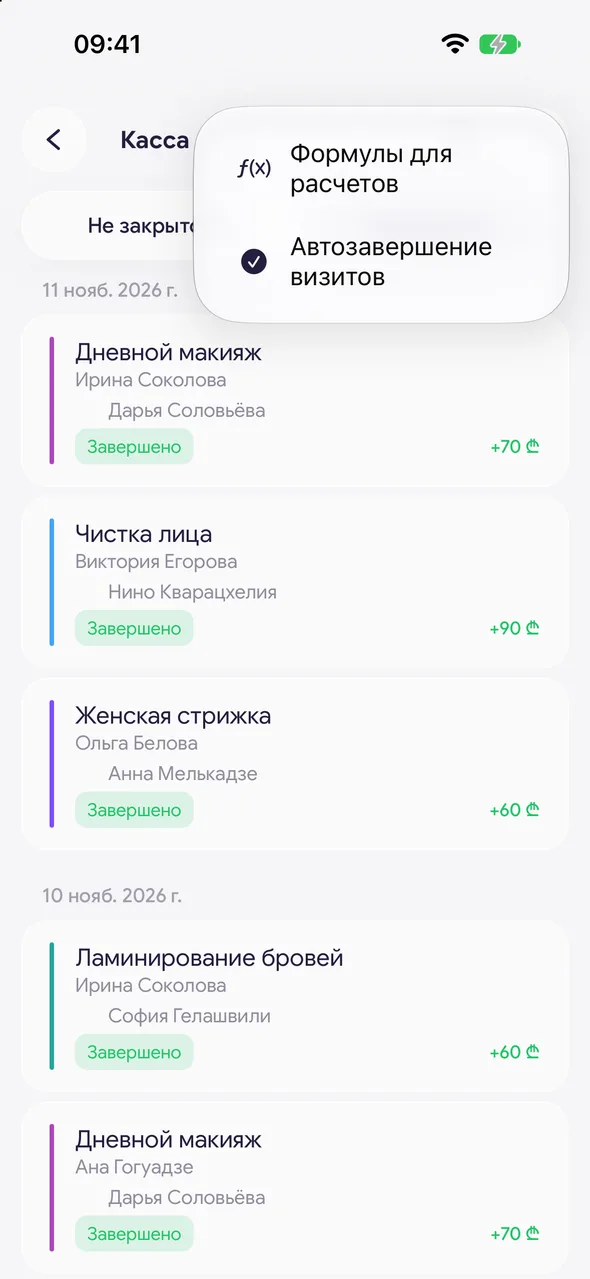
- 02
Enable
Visits will close on their own as soon as the service ends, and the ones a master closed will no longer wait for your confirmation. Tap "Turn on" - visits that were waiting for completion will close immediately.
- 03
Disable if you need to check
The same menu item - "Turn off": past visits will again wait for closing, and masters' visits - for your verification.
Good to know
A visit closes automatically about 10 minutes after the service ends - as paid in cash at the service price. The master is credited their percentage from the employee card, and goods added to the record are written off from stock along with the purchase price. Consumables and other payment methods can be added later by opening the visit on the "Closed" tab.
When auto-completion is enabled, the cash desk line in the profile says "Visits close automatically".
For a new account, auto-completion is enabled. When an employee is added to the salon, it is disabled: in a team, the master closes visits, and the owner verifies.
Questions and answers
FAQ
Why do visits close by themselves?
Auto-completion is enabled. To disable: "Cash register" - "⋯" - "Auto-close visits" - "Turn off".
See also
Free for a solo master
Try Easy Beezy
Calendar, clients, services and an online booking page - with no time limit. For a salon with a team - 14 days of full access.


