 Easy BeezyApp StoreGoogle PlayRuStoreInstall
Bookings
How to add several services or a second master to a booking
You can put several services in a row into one booking, and in the salon - two masters at the same time.
Step by step
- 01
One more service
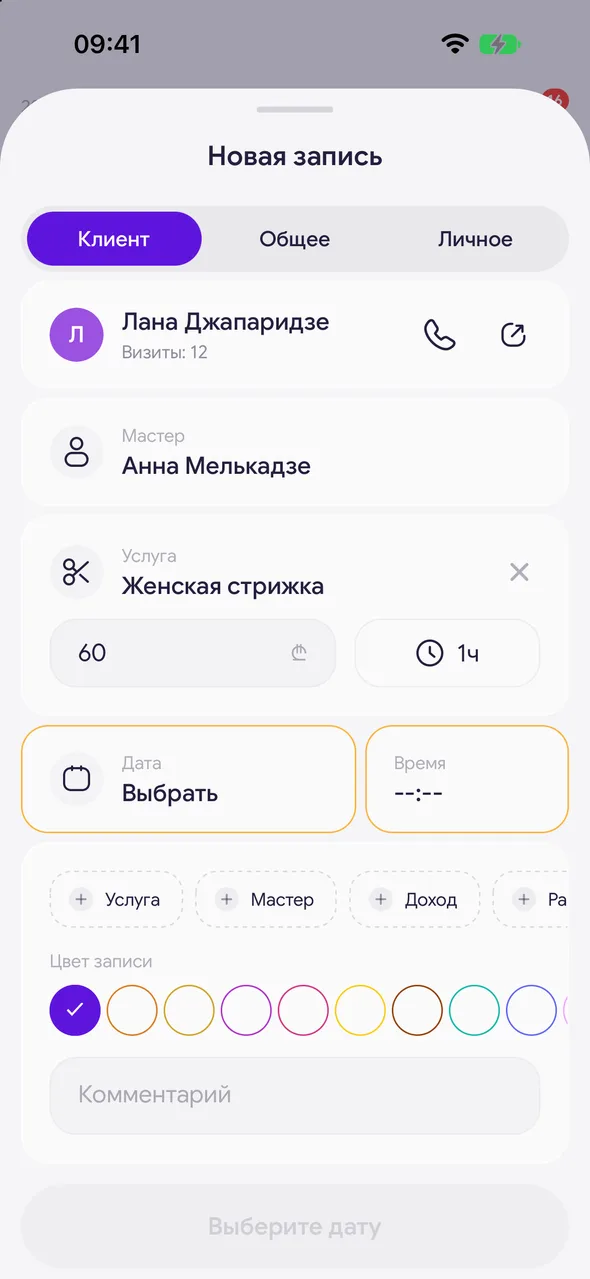
After the first service, a «+ Service» button will appear in the booking. Tap it and choose a service. The booking duration will add up, and prices are shown for each service.
- 02
Second master
In the salon, there is a «+ Master» button next to it. Choose a master - the booking will appear in both calendars.
- 03
Replacing
To replace a service or master, tap it in the booking and choose another one.
Good to know
The price of a service in a booking can be changed manually - for example, with a discount. This does not affect the service itself in the price list.
With the PRO plan, you can mark a prepayment, a product sale and an expense right in the booking.
Free for a solo master
Try Easy Beezy
Calendar, clients, services and an online booking page - with no time limit. For a salon with a team - 14 days of full access.


