 Easy BeezyApp StoreGoogle PlayRuStoreInstall
Bookings
How to reschedule an appointment
Rescheduling means editing the date and time in the appointment itself. You can immediately send the client a message about the change.
Step by step
- 01
Open the edit
Open the appointment, tap «⋯» and select «Edit».
- 02
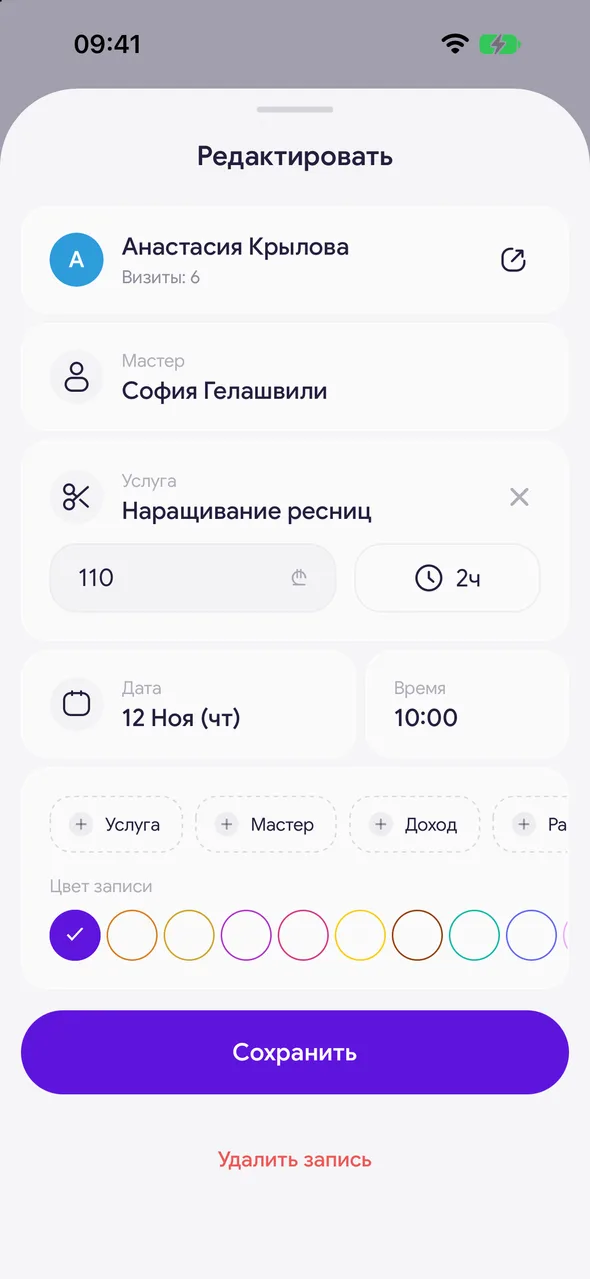
Change the date and time
Tap «Date» and «Time» and choose a new available slot. You can also change the master here.
- 03
Save
Tap «Save changes». A banner will appear at the bottom with the «Tell the client» button - it will open a ready-made message for the client with the new time.
Good to know
You cannot drag appointments on the timeline - rescheduling is only done through editing.
If the client has postponed the visit indefinitely, it is better to cancel the appointment with the reason «Reschedule».
See also
Free for a solo master
Try Easy Beezy
Calendar, clients, services and an online booking page - with no time limit. For a salon with a team - 14 days of full access.


