 Easy BeezyApp StoreGoogle PlayRuStoreInstall
Bookings
How to delete an appointment
Deleting erases the appointment completely, leaving no trace in the history. If the visit simply did not take place, it is better to cancel it.
Step by step
- 01
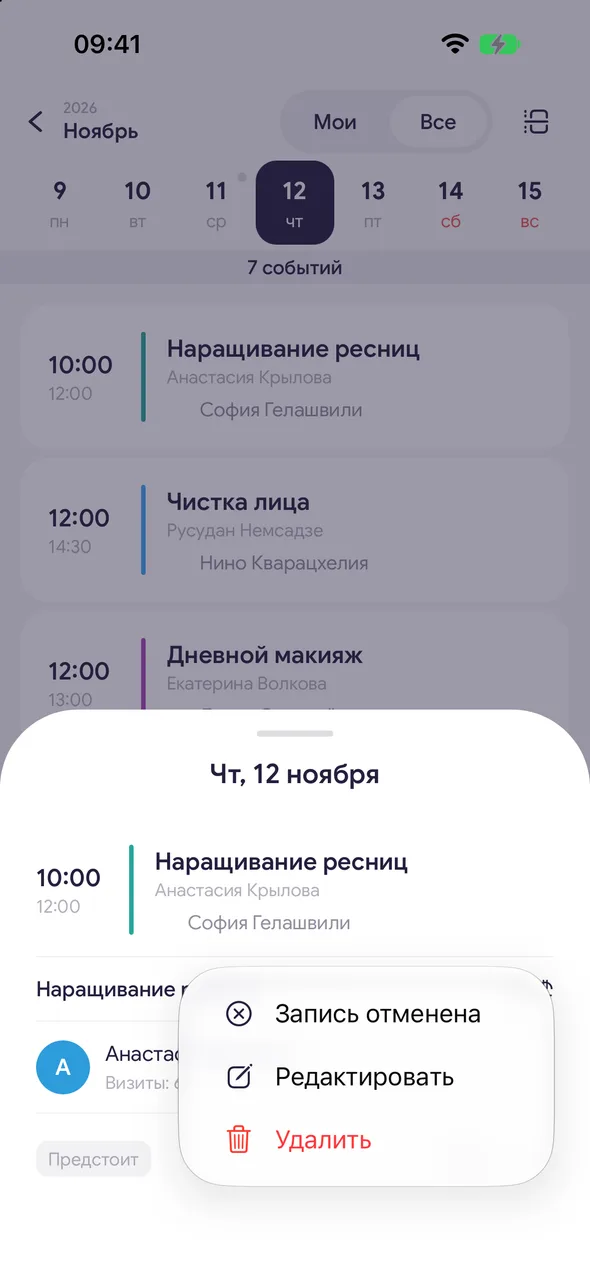
Select delete
Open the appointment, tap «⋯» - «Delete».
- 02
Confirm
The question «Delete booking?» will appear. Tap «Yes, delete».
Good to know
!
Only the salon owner and manager can delete a completed appointment.
!
For a recurring appointment, the app will ask what to delete: «This day only» or «Whole schedule».
See also
How to cancel an appointmentA cancelled appointment remains in the client's history with the cancellation reason, and the time is freed up for others.How to create a recurring booking and delete a seriesYou can set a regular client, your own recurring commitment or a meeting to repeat right away - in the booking form or by voice.
Free for a solo master
Try Easy Beezy
Calendar, clients, services and an online booking page - with no time limit. For a salon with a team - 14 days of full access.


