 Easy BeezyApp StoreGoogle PlayRuStoreInstall
Bookings
How to choose or add a client in a booking
You search for a client by name or phone right in the booking. You can create a new one right there without leaving the window.
Step by step
- 01
Open the client picker
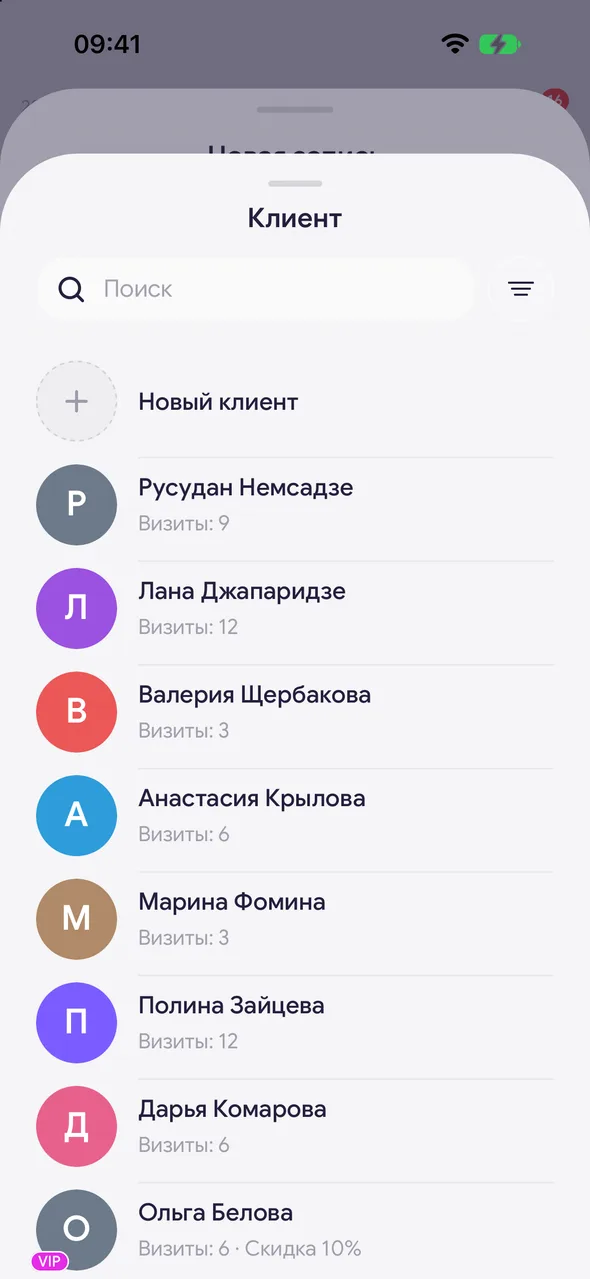
In a new booking, tap «Client». The client list will open.
- 02
Find the client
Start typing a name or phone in the «Search» field and tap the client. The number of visits and the discount are shown under the name.
- 03
Or create a new one
If the client is not there, tap «New client» - the name from the search will be filled in automatically. You can add a phone and social media there too.
Good to know
If the client did not give a name, choose the first row «Unknown» in the list - the booking will be saved without a client card.
If a new client's contact matches someone in the database, the «Client already exists» window will appear - choose which name to keep, and no second card will be created.
Tapping the client's name in the booking card opens their card with visit history.
Free for a solo master
Try Easy Beezy
Calendar, clients, services and an online booking page - with no time limit. For a salon with a team - 14 days of full access.


