 Easy BeezyApp StoreGoogle PlayRuStoreInstall
Settings and account
How to contact support from the app
Support replies in a chat right inside the app. You can attach a photo or screen recording to show the problem.
Step by step
- 01
Open the chat
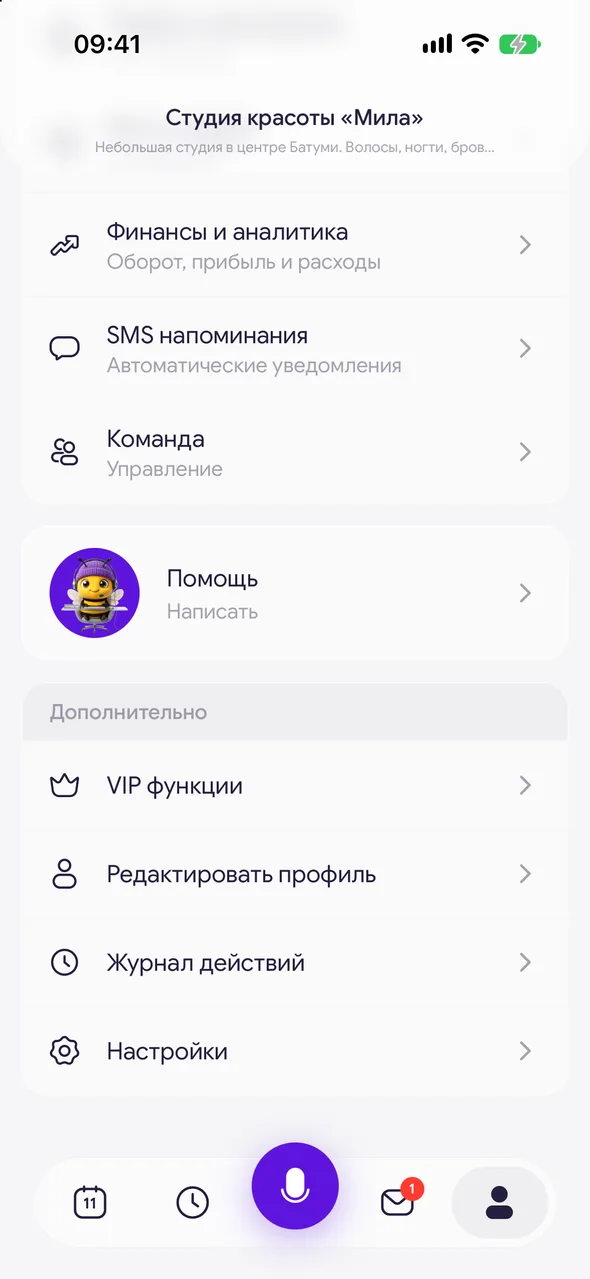
At the bottom of the screen, tap «Profile» and scroll to the «Help» card labeled «Write to us». Tap it - «Support chat» will open.
- 02
Write a message
Type your question in the «Message…» field and send it. To attach a screenshot or video, tap the paperclip.
- 03
Edit your message
Press and hold your message to choose «Edit» or «Unsend».
Good to know
The conversation is saved: the support reply and the whole history stay in the same chat.
Moving from another program? Write in this same chat - support will help transfer your clients and bookings.
Questions and answers
FAQ
Where is support in the app?
«Profile» - the «Help» card at the bottom of the screen. It opens the chat with support.
I can't log in to the app. How do I contact support?
On the code entry screen, tap «SMS not arriving?» - «Write to support» and leave your email. The reply will be sent there.
Free for a solo master
Try Easy Beezy
Calendar, clients, services and an online booking page - with no time limit. For a salon with a team - 14 days of full access.


