 Easy BeezyApp StoreGoogle PlayRuStoreInstall
Settings and account
How much space for photos and how many AI assistant requests you have
In the settings you can see how much space is used for photos and videos and how many voice AI assistant requests you have left this month.
Step by step
- 01
Open the limits
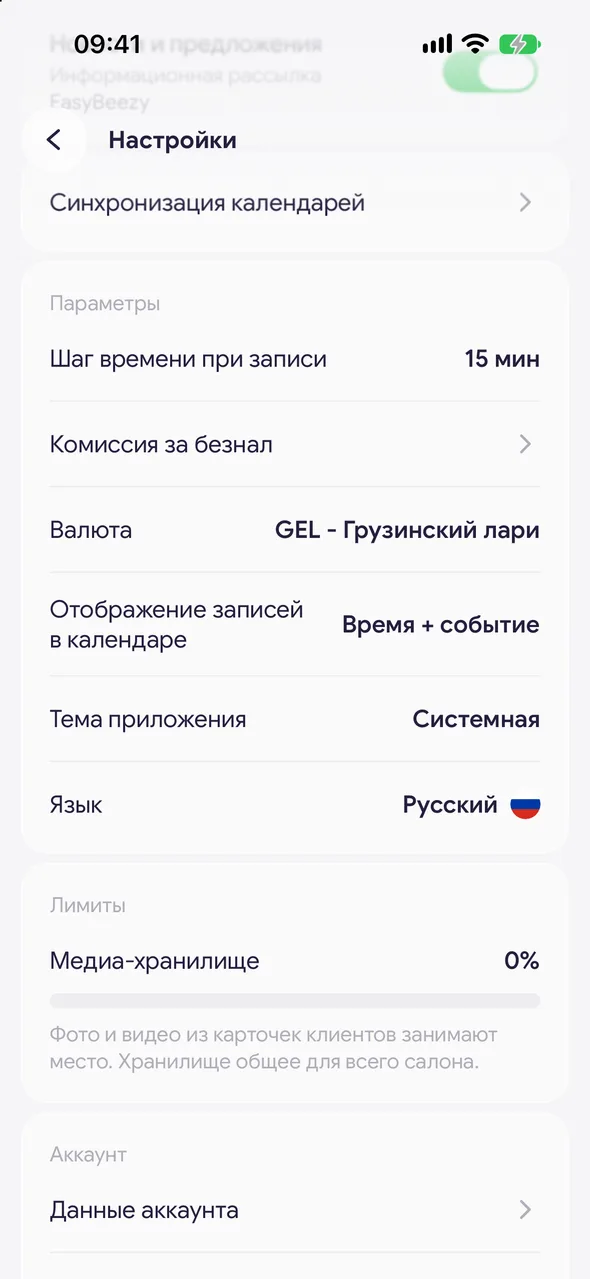
«Profile» - «Settings», group «Limits».
- 02
Media storage
The bar shows what percentage of the space is used. Photos and videos from client cards take up space. Storage is shared by the whole salon.
- 03
AI assistant
The number on the right is how many requests you have left out of the monthly limit. This includes voice input via the microphone and generating service descriptions. The counter resets on the 1st of each month.
Good to know
Free plan - 200 MB for photos and videos, on the PRO and TEAM plans - 2 GB. Without a subscription there is a «Expand with PRO» link under the bar.
On PRO and TEAM, AI assistant requests are unlimited, so there is no counter row.
Photos and videos you send to support chat do not take up any space.
Questions and answers
FAQ
I have run out of space. What should I do?
Delete unnecessary photos and videos from client cards or upgrade to PRO - the space will grow to 2 GB.
Free for a solo master
Try Easy Beezy
Calendar, clients, services and an online booking page - with no time limit. For a salon with a team - 14 days of full access.


