 Easy BeezyApp StoreGoogle PlayRuStoreInstall
Bookings
How to mark that a client did not show up
A no-show is marked as a cancellation with the reason «Client did not show up» - this way it is visible in the client's history.
Step by step
- 01
Open the cancellation
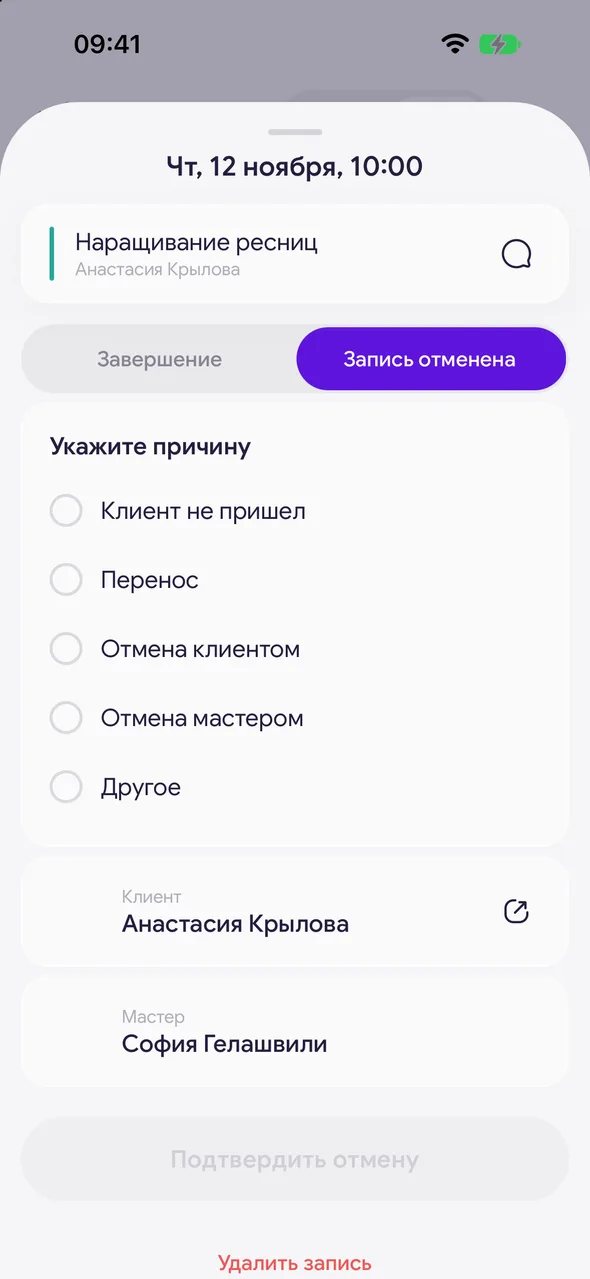
Open the appointment, tap «⋯» - «Cancelled».
- 02
Select no-show
Select «Client didn’t show up» and tap «Confirm cancellation».
Good to know
!
There is no separate «no-show» button in the appointment menu - a no-show is selected as the cancellation reason.
Free for a solo master
Try Easy Beezy
Calendar, clients, services and an online booking page - with no time limit. For a salon with a team - 14 days of full access.


